
Which Is Better in 2026?

Translating your WordPress website into multiple languages is one of the easiest ways to reach a wider audience, boost your SEO traffic, and increase your sales.
But with so many translation plugins available, choosing the right one can feel overwhelming. TranslatePress and WPML are established plugins with years of proven history, while Universally is a newer plugin that takes a different, more modern approach to translation.
I’ve tested all three on real WordPress sites. In this ultimate comparison, I’ll walk you through how they stack up on setup, translation quality, SEO, performance, WooCommerce support, customer support, and pricing so you can choose the right one for your business.
TL;DR: Universally is the best fit for most users, with the fastest setup, cloud performance, and the lowest entry price. TranslatePress is great if you want a live visual editor, and WPML wins for complex WooCommerce stores. Read on for the full breakdown.
For more information on each plugin, see our detailed WPML and Universally reviews and our guide to using TranslatePress.
If you’re also considering free or lower-cost alternatives, Polylang is worth a look. We cover it in our roundup of the best WordPress translation plugins.
My comparison covers seven criteria. You can use the quick links below to jump to any section:
Ease of Setup
Translating your WordPress site into multiple languages should be as painless as possible. Two of these tools can get you live in another language in under 10 minutes.
The third takes considerably more work, so it’s worth understanding what’s involved before you commit. Below, I break down how each tool handles setup.
TranslatePress – Ease of Setup
The TranslatePress setup is simpler than WPML’s. You install the plugin from WordPress.org, select your languages in the settings, and the front-end translation editor becomes available immediately (with no API key required).
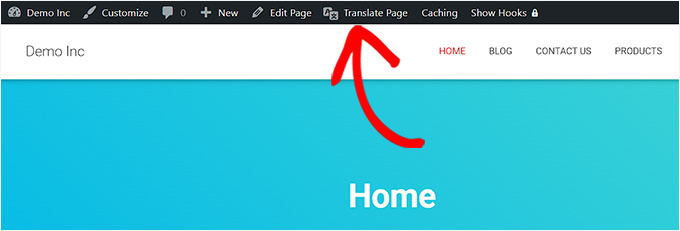
From there, you click ‘Translate Site’ in the WordPress admin bar and start clicking on any text element on your live page to translate it. There are no backend spreadsheets and no separate dashboard.
One thing to know upfront: automatic language detection (showing visitors a prompt to switch to their preferred language) requires the Business plan at €199/year (~$230 USD).
On the Personal plan, you can add a language switcher, but visitors choose the language themselves.
WPML – Ease of Setup
WPML requires more up-front configuration than both the other plugins. The Multilingual CMS plan requires at minimum two separate plugin components: WPML core for your posts and pages, and String Translation for your theme, plugin, and widget text.
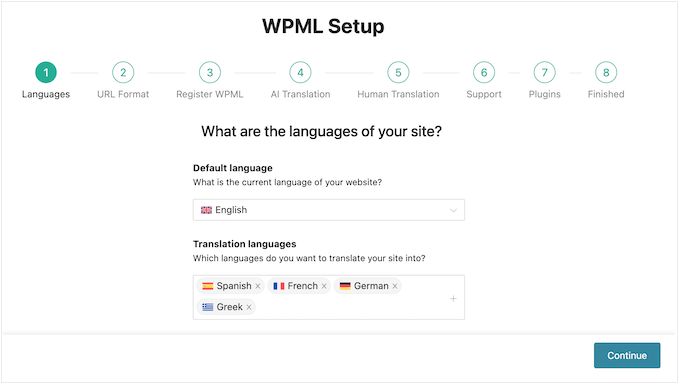
Each component has its own setup wizard, and translations don’t happen automatically. You trigger them page by page, or enable ‘Translate Everything’ mode and configure how your automatic translation credits are spent.
In my testing, even translating a straightforward site took the better part of an hour. On a larger site with a complex theme or custom post types, plan for more time still.
That complexity exists for a reason. WPML gives you a level of granular control that TranslatePress and Universally don’t offer. But if you don’t need that level of control, the overhead isn’t worth it.
Universally – Ease of Setup
Universally surprised me with how little it asks of you. Just install the plugin, paste your API key from the Universally dashboard, and choose your target languages. That’s the entire process.
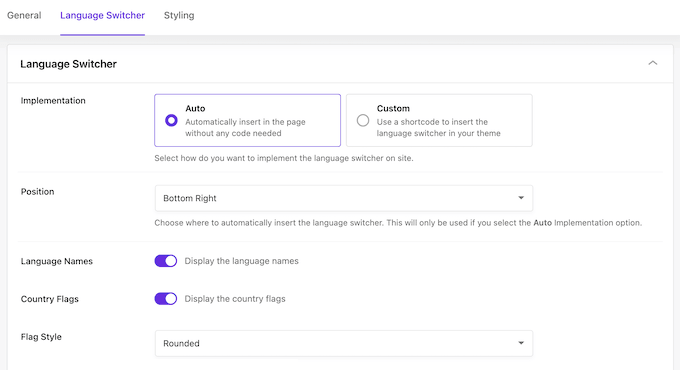
The language switcher appears on your site automatically. There’s no shortcode to place, no template editing, and no per-page translation to trigger.
Language detection, SEO configuration, and switcher positioning all happen without any additional setup. That means most sites are live in another language in under 10 minutes.
Winner for Ease of Setup: Universally
Universally is the fastest by a clear margin, and TranslatePress is a solid second. The visual editor is intuitive and setup is much simpler than WPML’s, but it’s not quite as instant as Universally’s API-key flow.
For most site owners who want to get started without spending an afternoon on configuration, Universally or TranslatePress is the better choice. WPML’s setup overhead is only worth it if you specifically need the depth it provides.
Translation Quality
Machine translation has improved significantly, and all three of these tools produce readable output for most language pairs. Where they differ is in how you fix errors and how much editorial control you have over the final result.
TranslatePress – Translation Quality
TranslatePress uses a combination of large language models and neural machine translation engines. It automatically selects the best approach for each language pair and content type.
All paid plans include TranslatePress AI with varying word allowances. DeepL (a highly accurate premium AI translation engine) integration is available on Business and Developer plans for users who prefer it.
What sets TranslatePress apart from both alternatives is the front-end visual editor, which is available on every plan including free.
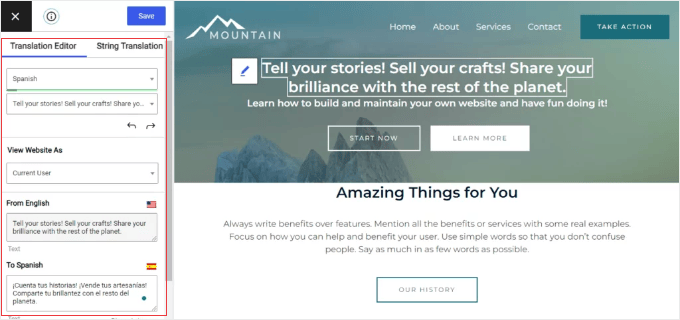
You can click directly on any text element on your live page and type the corrected translation in the sidebar. The page updates in real time as you type.
Translation Memory is also included on all plans and applies existing translations automatically to new strings with at least 95% similarity, which means you’re not re-translating the same content repeatedly.
WPML – Translation Quality
WPML takes a fundamentally different approach: it’s manual by default, meaning you control every translated string.
Machine translation is available as a paid add-on through DeepL, Google Translate, and Microsoft Azure Translator. Credits are included with CMS and Agency plans, and the workflow is built around human review rather than publishing AI translated output directly.
The Advanced Translation Editor gives professional translators a side-by-side editing interface with Translation Memory (which reuses previous translations for repeated strings) and a reviewer role for quality-checking before publication.
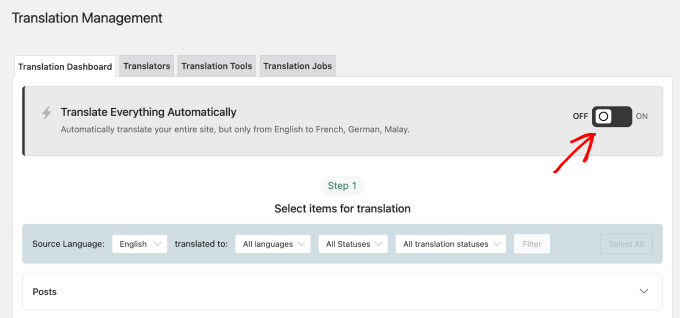
If translation accuracy is mission-critical for legal content, medical information, or anything where a mistranslation has real consequences, WPML’s manual-first workflow is built for that.
Universally – Translation Quality
Universally uses custom AI models trained specifically for web content rather than general-purpose language models. That specialization helps it maintain brand voice and context rather than substituting word for word.
Universally reports approximately 90–95% accuracy across most language pairs.
The Glossary (available on all paid plans) lets you lock brand names, product terms, or any phrase that needs to be rendered a specific way. That rule is then applied everywhere across your site automatically.
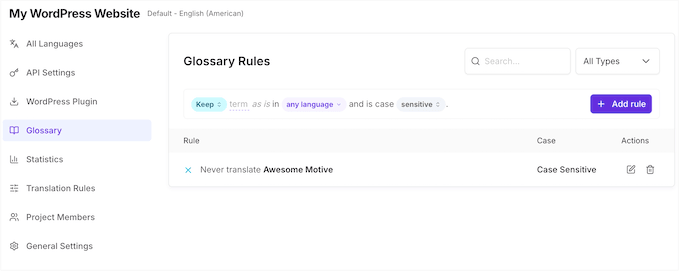
Beyond the Glossary, Universally is designed to be largely hands-off. The goal is accurate translations on the first pass, so you spend less time correcting them.
Dedicated editing tools, including a dashboard text editor and a live visual editor, are on the roadmap for users who want finer control, but they aren’t available just yet.
Winner for Translation Quality: Tie — Universally and TranslatePress
Universally and TranslatePress both produce fantastic translations, but they win for different reasons.
If you want to publish AI translations as-is and rarely touch them, then Universally is the winner. Because its custom AI models are trained specifically for web content, it does a superior job of maintaining your brand voice and context right out of the box without requiring manual fixes.
However, the moment you want to do extensive manual editing, TranslatePress is the winner. Its click-to-correct visual editor is a massive practical advantage that makes tweaking translations incredibly easy.
WPML remains in a different category: it’s designed for professional translator pipelines and mission-critical content, not typical WordPress publishing.
Multilingual SEO
Publishing in multiple languages only helps if search engines can find and index those pages correctly.
All three tools cover the technical SEO basics, but there are meaningful differences in what’s included automatically and what’s gated behind higher-tier plans.
TranslatePress – Multilingual SEO
The SEO Pack addon is included in all TranslatePress paid plans, starting with Personal (€99/year or ~$115 USD).
It handles hreflang tags, multilingual XML sitemaps, translated meta titles and descriptions, image alt text, Open Graph metadata, and translated URL slugs.
The x-default hreflang tag (which tells search engines which language version of your site to show when none of your available languages match a visitor’s preference) is configurable in TranslatePress’s advanced settings.
URL slug translation is also available on all paid tiers without needing to upgrade. Some competing tools charge significantly more for the same feature.
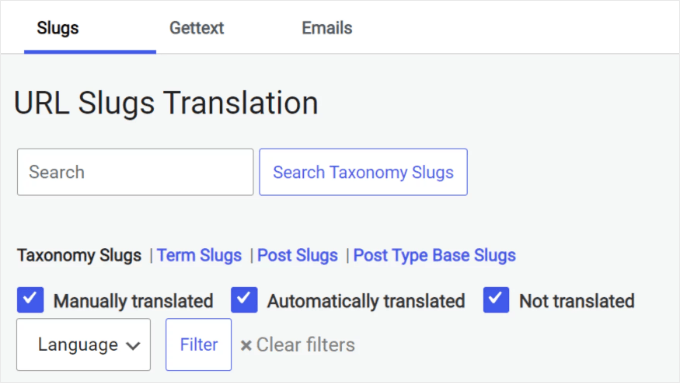
Plus, TranslatePress works with Yoast SEO, Rank Math, AIOSEO, SEOPress, and Slim SEO for multilingual sitemaps.
WPML – Multilingual SEO
WPML’s dedicated SEO addon is included in its Multilingual CMS and Agency plans.
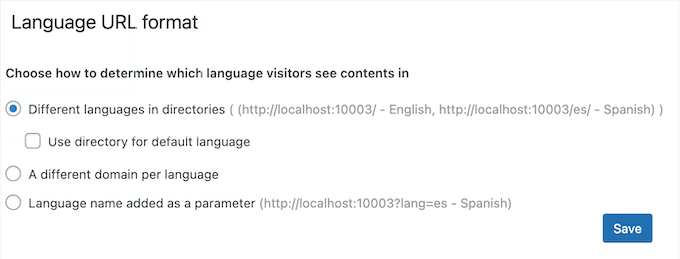
This addon covers everything: hreflang tags in XML sitemaps, the x-default hreflang tag (which tells Google which version to serve when no language match exists), translated URL slugs on all plans, and per-language meta titles and descriptions.
Additionally, deep compatibility with AIOSEO and Yoast SEO means all your SEO plugin fields are automatically included in the translation workflow. But there is one caveat: Yoast SEO Premium’s Redirects feature is not compatible with WPML.
Universally – Multilingual SEO
Universally handles the full multilingual SEO stack automatically.
Hreflang tags, translated meta titles and descriptions, multilingual XML sitemaps, schema.org structured data, and RTL (Right to Left) language support for languages like Arabic or Hebrew all activate the moment you add a language, with no manual configuration needed.
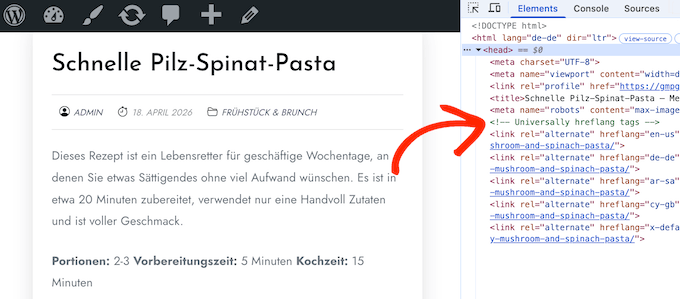
This is one of Universally’s genuine strengths: you get solid multilingual SEO without ever opening an SEO settings page.
It also generates schema.org markup for you out of the box, which is handy, since with TranslatePress or WPML you’d typically rely on your SEO plugin (like AIOSEO or Yoast) to add structured data. Just keep in mind that schema is general SEO rather than a multilingual feature on its own.
Winner for Multilingual SEO: Tie — WPML and TranslatePress
Both WPML and TranslatePress cover the full technical SEO stack on all paid tiers, including x-default hreflang and translated URL slugs, with no plan upgrades required.
Universally handles the international SEO essentials automatically, but it currently lacks the deep, granular control over x-default tags and native URL slug translations found in WPML and TranslatePress.
If you’re already committed to Yoast or AIOSEO for your SEO workflow, then both WPML and TranslatePress integrate cleanly with either tool.
Performance and Site Speed
Site speed matters for both SEO and conversions. And adding multiple languages can slow things down if your translation plugin isn’t built efficiently.
These three tools take fundamentally different architectural approaches to storing and serving translated content.
TranslatePress – Performance and Site Speed
Like WPML, TranslatePress stores translations directly in your WordPress database. The same database weight issue applies as your content grows.
One practical upside: Translation Memory means each unique string is only translated once (API calls happen once per string). After the first visit in a new language, every subsequent visitor gets the cached database version with no additional processing.
And because your translations live in your own database, your site keeps working even if the TranslatePress service goes offline or you cancel your subscription.
WPML – Performance and Site Speed
WPML stores translations in your WordPress database as duplicate entries for each language. In my testing, I found that this added around 0.3–0.5 seconds on sites without caching enabled.
A quality caching plugin brings most of that back, but the database weight compounds over time. On a site with hundreds of posts translated into multiple languages, the overhead becomes harder to ignore even with good caching in place.
Tip: If you’re using WPML, then install a caching plugin before going multilingual. The performance impact on an uncached site is noticeable. See our guide to the best WordPress caching plugins for our top recommendations.
TranslatePress and Universally also benefit from proper caching configuration. Make sure your caching plugin serves different cache files per language.
Universally – Performance and Site Speed
Universally serves translated content from a global CDN with 200+ edge locations and writes nothing to your WordPress database. Your site’s database stays the same size regardless of how many languages you add.
One setup step worth doing: configure your caching plugin to serve different cache files per language. Most popular options like WP Rocket handle this with a simple toggle. It’s a one-time task, but it’s not automatic out of the box.
Because Universally runs on the cloud, your translations are stored on its servers and synced automatically, so there’s nothing to maintain and nothing weighing down your own database. As with any cloud service, your translated pages stay live for as long as your subscription is active.
Winner for Performance and Site Speed: Universally
Universally wins on performance, and it’s not particularly close. The combination of global CDN delivery and zero database writes gives it a real advantage over both TranslatePress and WPML, which both bloat your database over time.
If site speed is a top priority and you’re comfortable with cloud-hosted translations, then Universally’s approach is the easier one.
WooCommerce Support
Running a WooCommerce store in multiple languages is more complex than translating a standard site.
Unlike a blog or informational page, a WooCommerce store has moving parts (dynamic cart messages, checkout error notices, and automated order confirmation emails) that all need to display correctly in each customer’s language.
If a customer browses your store in Spanish but receives an automated order receipt in English, it can cause confusion and seriously damage brand trust.
Not every plugin handles all of that equally well, which makes this one of the most important sections if you run an online store.
TranslatePress – WooCommerce Support
TranslatePress translates WooCommerce stores via the same front-end visual editor, with no extra addons required. Product pages, descriptions, cart, and checkout flows are all covered automatically.
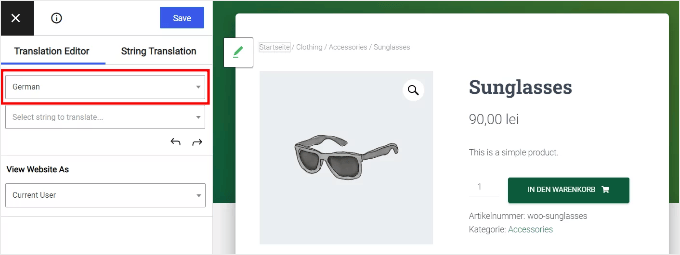
Order confirmation emails are sent in the language the customer used while browsing. For logged-in users, TranslatePress remembers their last active language.
For guest users, the language used at checkout becomes the default for all subsequent emails from that order.
The one gap versus WPML is multi-currency. TranslatePress has no built-in currency switching, so if you want to display prices in local currencies, you’ll need a dedicated multi-currency plugin.
WPML – WooCommerce Support
WPML’s WooCommerce Multilingual add-on, included with the Multilingual CMS plan, is the most thorough WooCommerce integration I’ve seen in any translation plugin.
It automatically matches the buyer’s language across your entire store, covering:
- Products, categories, and attributes
- Product variations and custom fields
- Cart and checkout flows
- Shipping method names
- Order confirmation emails
Native multi-currency support is built in, with 200+ currencies available. You can set exchange-rate-based pricing or override prices manually per product per currency.
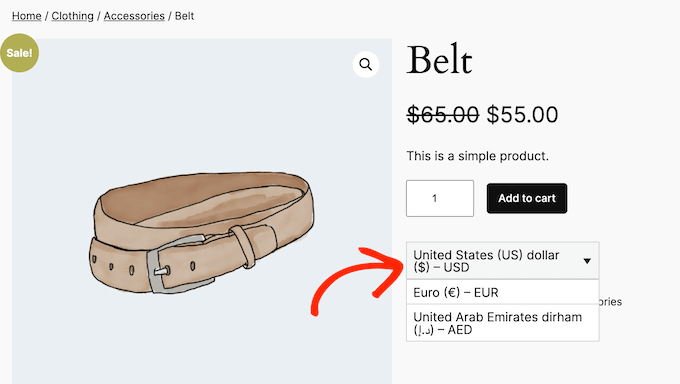
Location-based currency display is also included, so visitors automatically see prices in their local currency.
Universally – WooCommerce Support
Universally handles WooCommerce translation the same way it handles everything else: automatically, with no addons to install and no per-product configuration needed. Products, descriptions, image alt text, and the full cart and checkout flow are all covered.
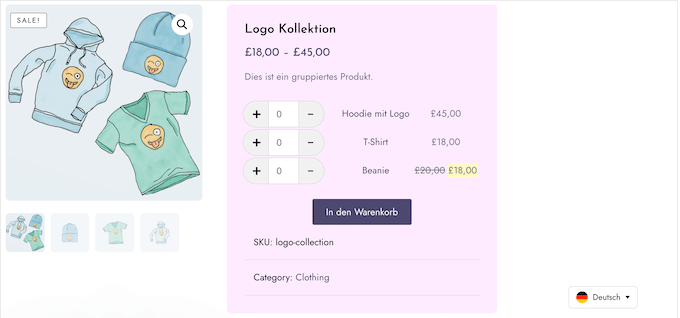
Like TranslatePress, Universally doesn’t include native multi-currency support. If you want to display prices in local currencies, you’ll need a separate plugin for that.
Winner for WooCommerce Support: WPML
If WooCommerce is central to your business, then WPML wins this without much contest. Native multi-currency, fine-grained control over translated product attributes and variations, and language-matched order emails put it in a different league from both alternatives.
TranslatePress handles most WooCommerce translation needs well and is a good fit for simpler stores. The multi-currency gap is the main thing that holds it back against WPML for serious international stores.
On the other hand, Universally covers the basics, but it’s not built for complex multilingual WooCommerce setups.
Customer Support
No plugin works perfectly forever, and when something breaks on a multilingual site, the quality and availability of support can make a real difference.
All three tools offer support, but the hours, track records, and response consistency vary significantly.
TranslatePress – Customer Support
TranslatePress has a strong support reputation backed by a large user base. WordPress.org rates it 4.7/5 across more than 1,600 reviews, and Trustpilot rates it 4.6/5. Reviewers frequently mention support agents by name and describe getting clear, practical answers quickly.
Keep in mind that support is weekday-only and not available 24/7. For complex or production-critical issues, some users report response delays.
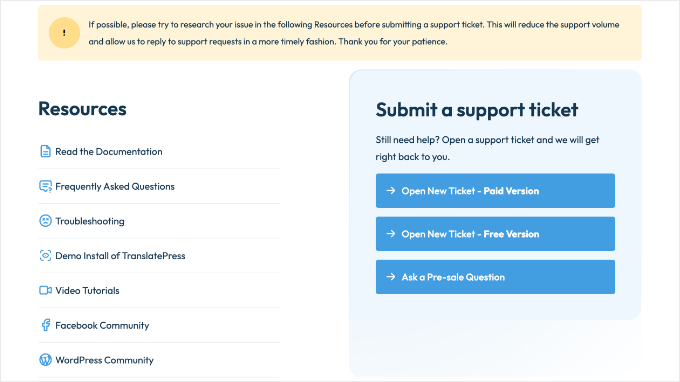
The pattern in reviews suggests the support team handles typical questions well but can be slower to resolve tricky edge cases.
My Experience: In my testing, I found TranslatePress support responsive and technically knowledgeable for standard setup questions. The weekday-only hours are worth knowing about if you’re likely to need urgent help outside business hours.
WPML – Customer Support
WPML’s support reputation is remarkable, and by all accounts it’s earned. Available 22 hours a day in nine languages, it scores 4.7/5 on both G2 and Capterra, which is their highest-rated category on both platforms.
In the majority of five-star reviews, support is the reason people cite for staying with WPML rather than switching. The words that come up repeatedly are ‘incredibly fast and accurate’ and ‘proactive’, which is a hard reputation to maintain across hundreds of reviews.
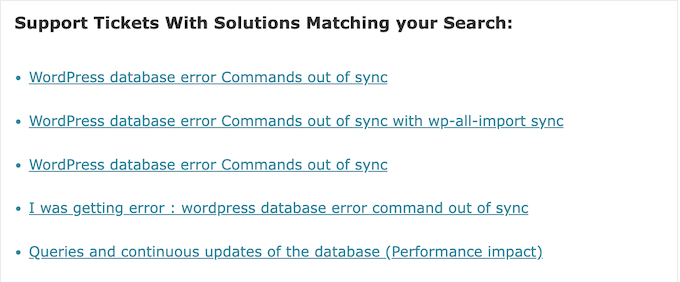
Every plan includes direct ticket access with no tier gating. A searchable forum of previously resolved tickets means you can often solve a common problem without waiting for a response at all.
Universally – Customer Support
While Universally is a newer plugin, it is built by Awesome Motive, which is the same company behind WPBeginner.
Awesome Motive is also the company behind popular plugins like WPForms, AIOSEO, and OptinMonster, which together, run on millions of WordPress sites. So, Universally launches with an established engineering and support operation behind it rather than starting from zero.
Day to day, support is handled through ticket submission, with priority turnaround for Pro plan users.
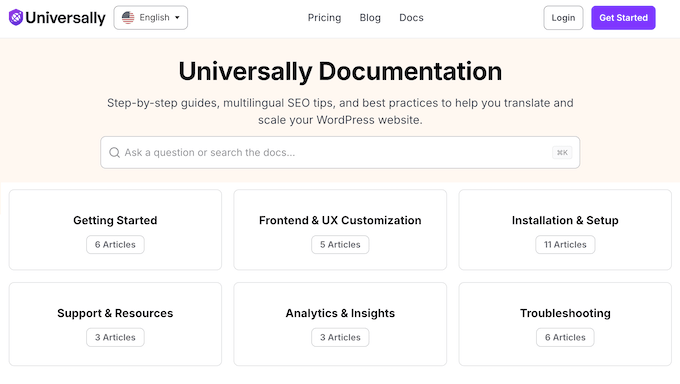
The documentation is also a genuine strength for such a new plugin. It covers installation, language management, troubleshooting, SEO, and a developer API section.
Plus, it’s written for site owners rather than developers, so you can resolve most common setup questions yourself without waiting on a reply.
Winner for Customer Support: WPML
WPML wins this one. Around-the-clock availability in nine languages, and a support reputation strong enough that it’s the most common reason users give for not switching to something else.
TranslatePress is a solid second. Its support is well-reviewed and the team clearly knows the product. The weekday-only model is a limitation, but overall review scores are strong and the user base is significantly larger than either alternative.
Universally has strong documentation and Awesome Motive’s support team behind it, but it doesn’t yet have the live support track record to challenge WPML here.
Pricing
Pricing is where these three tools differ most sharply. TranslatePress and WPML both charge flat annual fees. Universally charges per word, per month, with pricing in USD.
Which model works out cheaper depends on how much content you have and how frequently you publish. I’ll break down each one so you can see where the value shifts.
TranslatePress – Pricing
TranslatePress offers a free core plugin on WordPress.org, which includes manual translation and one additional language.
Paid plans add AI translation, SEO Pack, and more languages:
- Free: 1 additional language, basic features, 2,000 AI translation words.
- Personal (€99/year or ~$115 USD): 1 site, 50,000 AI translation words, SEO Pack, and multiple languages.
- Business (€199/year or ~$230 USD): 3 sites, 200,000 AI words, DeepL integration, automatic language detection, translator accounts, and all addons.
- Developer (€349/year or ~$405 USD): Unlimited sites, 500,000 AI words.
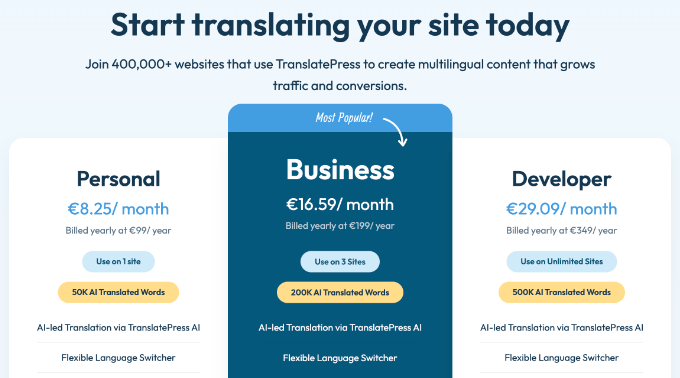
A 15-day money-back guarantee is included.
One meaningful detail: if your subscription lapses, then your existing translations remain in your database and your site keeps functioning in all languages. You lose access to new translations and updates, but your translated content stays live.
WPML – Pricing
WPML has no free version.
Prices are in EUR and fluctuate with exchange rates:
- Blog (€39/year or ~$45 USD): 1 site, basic translation, no WooCommerce support, and no auto-translation credits included.
- Multilingual CMS (€99/year or ~$115 USD): 3 sites, WooCommerce support (WCML addon), and 90,000 auto-translation credits.
- Agency (€199/year or ~$230 USD): Unlimited sites, 180,000 auto-translation credits.
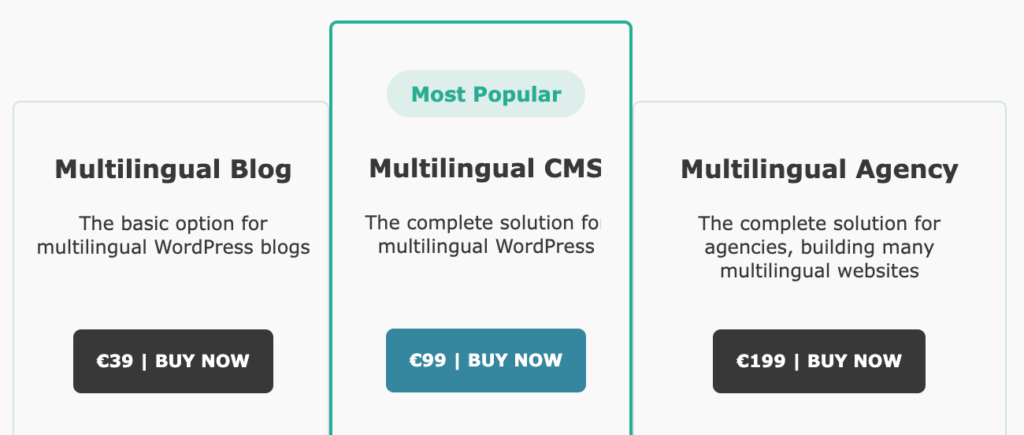
A 30-day money-back guarantee is included. WPML’s flat annual fee is where it becomes interesting for larger sites: it charges the same price no matter how much content you translate.
Universally – Pricing
Universally prices in USD and charges per word per month.
Plans are structured by word volume and number of languages:
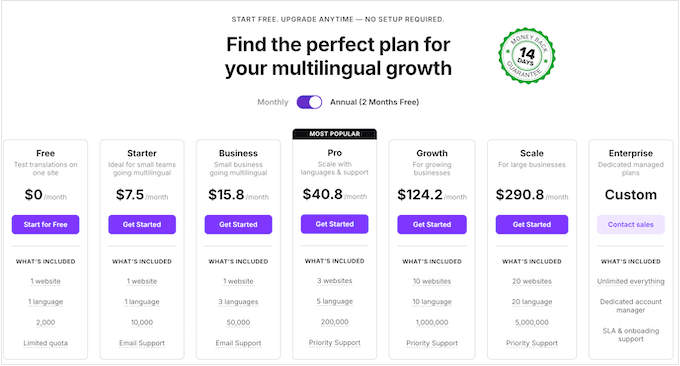
- Free: 1 language and 2,000 words, no credit card required.
- Starter ($7.50/month): 1 site, 1 language, and 10,000 words.
- Business ($15.80/month): 1 site, 3 languages, and 50,000 words.
- Pro ($40.80/month): 3 sites, 5 languages, and 200,000 words.
Annual billing saves around 17%, and your purchase is covered by a 14-day, no-questions-asked money-back guarantee.
Since Universally is a cloud-based service, you don’t have to worry about paying for server upgrades to handle a massive database of translations. Its low entry price makes it accessible for small businesses looking to grow their global traffic affordably.
Winner for Pricing: Universally
For most single-site owners, Universally is the clear winner for pricing. It is the most affordable entry point, and the Business plan at $15.80/month gives you plenty of headroom (50,000 words across 3 languages) to grow.
However, if you are an agency managing multiple sites or translating hundreds of pages daily, WPML’s flat-fee model at €99/year (~$115 USD) offers the best high-volume value since there are no per-word limits.
TranslatePress vs WPML vs Universally: Which One Is Better?
I tested all three translation plugins across seven criteria. Here’s how the results stack up at a glance:
There’s no single winner for every situation, but the right choice usually becomes clear once you know what matters most to you.
If you want the easiest setup, fast performance, and the best overall value, Universally is my top pick.
It handles translation, multilingual SEO, and performance automatically. There are no heavy addons to install, no database bloat to worry about, and no confusing configurations.
It’s a strong choice for most WordPress users who want to go multilingual quickly and affordably.
If you want to translate visually and keep translations stored on your own server, choose TranslatePress.
The front-end visual editor is genuinely easy to use, and the experience of clicking on live page text to translate it in context is something users consistently praise. Because translations live in your database, they stay with you even if your subscription lapses.
If you’re running a serious WooCommerce store or need professional translator workflows, choose WPML.
WPML’s WooCommerce integration goes deeper than either alternative, with native multi-currency support and translated order emails. At €99/year (~$115 USD) for 3 sites, the CMS plan also offers excellent flat-fee value for agencies managing multiple client sites.
Frequently Asked Questions About Translation Plugins
Here are answers to the questions we hear most often about these three translation plugins.
Which translation plugin is best for beginners or small businesses?
For most beginners and small businesses, Universally is the best fit. It has the fastest, easiest setup, the lowest entry price, and translates your whole site automatically, so you can go multilingual quickly and cheaply without touching any configuration.
If you’d rather edit your translations visually by clicking directly on the live page, and you want to keep your translations stored in your own database, then TranslatePress is the better choice.
And if you’re running a serious or growing WooCommerce store, or you need professional translator workflows, then WPML is built for that.
Is TranslatePress better than WPML?
It depends on what matters most to you. TranslatePress has an easier front-end visual editor and keeps your translations in your own database, so they stay with you even after your subscription ends.
WPML has stronger WooCommerce support with native multi-currency, a deeper professional translator workflow, and better-documented customer support with nearly round-the-clock availability.
If you’re a solo site owner who wants visual editing and data ownership, then TranslatePress is the better fit. If you’re running a WooCommerce store or need agency-level translation management, then WPML is the stronger tool.
Does TranslatePress slow down my site?
Somewhat, yes. Like WPML, TranslatePress stores translations in your WordPress database.
On smaller sites the impact is minimal. On large sites publishing frequently in multiple languages, the database weight grows over time.
A quality caching plugin handles most of the front-end page-load overhead for your visitors, but the database itself keeps growing, which can eventually slow down your backend WordPress admin dashboard.
Universally avoids this entirely. Translations are served from a cloud CDN with no database writes at all.
Can I switch from Universally to TranslatePress?
Yes. Because Universally is cloud-based, your translations live on its servers and sync automatically, which is exactly what keeps your database clean and your setup maintenance-free.
The trade-off is that they aren’t stored locally to export, so if you later move to a self-hosted plugin like TranslatePress, you’d regenerate the translations fresh with that tool’s own AI. If you’ve customized any terms in Universally’s Glossary, note them down first so you can recreate them quickly in the new tool.
Does TranslatePress have a free version?
Yes. The free version is available on WordPress.org and lets you add one additional language to your site with basic translation functionality, including manual translation via the visual editor and 2,000 AI translation words.
It doesn’t include automatic translation credits beyond those 2,000 words, the SEO Pack addon, or URL slug translation. Those require a paid plan starting at €99/year (~$115 USD).
WPML, by contrast, has no free version at all.
Is Universally free?
Yes. Universally has a free plan that lets you translate your site into 1 language with up to 2,000 words, and no credit card is required to start.
If you outgrow the free tier, then paid plans start at $7.50 per month for the Starter plan. Annual billing saves around 17%, and every paid plan is covered by a 14-day money-back guarantee.
How many languages do these plugins support?
TranslatePress supports 160+ languages. Universally supports 110+. WPML supports 65+ with 2,500+ language pair combinations.
For most sites, all three cover the languages you need. For less common languages, TranslatePress gives you the widest selection.
Is WPML still worth using?
Yes, for the right use case. WPML remains the most powerful option for complex WordPress setups, particularly deep WooCommerce integration, professional translator workflows, and agency multi-site management.
The setup takes longer and there’s no free tier, but for advanced multilingual sites it’s still the most capable option available. If those specific strengths don’t apply to your site, then TranslatePress or Universally will serve you better with less effort.
Do these plugins work with Elementor, Divi, and other page builders?
Yes, all three work with the major page builders, but in different ways. WPML has the most thorough integration. Over 1,000 plugins and themes are certified compatible through its Go Global program, including Elementor, Divi, Beaver Builder, and WPBakery.
If you’re running a complex page builder setup, WPML’s certification is worth knowing about.
TranslatePress translates page builder content via its front-end visual editor. Because you’re clicking on content as it appears on the live page, it handles most page builders automatically.
Some dynamically loaded strings may need a manual scan, but the process is straightforward for most setups.
Universally translates page builder content automatically through its cloud translation layer. Because translations are applied at the cloud level before content is served, most page builders are handled without additional configuration.
Additional Resources About WordPress Translation
I hope this article helped you choose the best translation plugin for your WordPress website.
You may also find these other guides on multilingual WordPress useful:
If you liked this article, then please subscribe to our YouTube Channel for WordPress video tutorials. You can also find us on Twitter and Facebook.
