
The ultimate guide to shadow IT detection


Alright, let’s cut to the chase. How many SaaS apps do you think are running in your organization right now? Take a number, any number.
Now, hold that thought.
According to the 2025 State of SaaS report from BetterCloud, the average company uses 106 different SaaS applications. But here’s the kicker: Gartner estimates that a staggering 30-40% of IT spending in large enterprises is on shadow IT (tools flying completely under the radar).
If you’re doing the math right now and feeling a cold sweat, you’re not alone. Welcome to the wild, untamed world of shadow IT.
For IT admins, this isn’t just a surprise party; it’s a horror movie waiting to happen.
Shadow IT is any software, hardware, or service being used for work without your explicit, benevolent, and all-knowing approval. We’re talking about everything from developers using unvetted code repositories and marketing teams adopting the latest “revolutionary” AI-powered social media scheduler, to an entire department running its projects on a personal Trello board. It’s the digital equivalent of finding a bunch of mystery meat in the corporate fridge. No one knows where it came from, what’s in it, or how long it’s been there, but you have a sinking feeling it’s going to cause problems.
Why do our colleagues venture into these dark alleys of the internet? It’s rarely malicious.
Employees are just trying to get their jobs done. The sanctioned CRM is clunky, so they find a sleeker one. The approved file-sharing service has upload limits, so they turn to a personal Dropbox account. They’re looking for a productivity shortcut, but what they’re actually creating is a massive, tangled web of security risks, compliance headaches, and budgetary black holes.
This is where you, the heroic IT admin, come in. This guide isn’t about telling you to lock everything down and become the “department of no”. It’s about giving you a strategic playbook – a step-by-step guide for effective shadow IT detection, management, and how to turn this chaotic mess into a secure, streamlined, innovative SaaS environment.
It’s time to shine a light on the shadows.
The hidden dangers of unmanaged SaaS
Shadow IT isn’t just a minor annoyance or a few extra apps to track; it’s a multi-headed hydra of risk. Each unmanaged application is a potential vector for chaos, and it’s crucial to understand the full scope of the threat. It goes far beyond just being a “security problem.”
The security implications are what keeps all of us up at night. Unsanctioned apps are the wild west of your tech stack. They haven’t been vetted, tested, or configured by you. This creates a host of vulnerabilities:
- Expanded attack surface: Every new app is a new door into your network. Many of these free or low-cost tools are built with speed to market in mind, not enterprise-grade security. They might have unpatched vulnerabilities, weak encryption standards, or questionable data handling practices, essentially rolling out the welcome mat for attackers.
- The SSO/MFA black hole: You’ve spent ages implementing Single Sign-On (SSO) and Multi-Factor Authentication (MFA) across your sanctioned apps. It’s your security fortress. Shadow IT completely bypasses it. Employees are creating accounts with weak, reused passwords (CompanyName123!, anyone?), leaving a trail of insecure credentials scattered across the internet. A breach of one of these flimsy services could lead attackers right to your corporate data.
- Accidental oversharing and data leakage: Think about the permissions these apps request. That “handy” new browser extension might be scraping every webpage visited, or that free PDF converter could be storing copies of sensitive financial reports on an unknown server. Employees, in their haste to be productive, often grant overly permissive access (e.g., “Read/Write access to all Google Drive files”), creating silent data leaks that you have zero visibility into.
Data privacy and compliance violations aka the “billion-dollar boogeyman”
If security risks are the immediate fire, compliance violations are the slow-burning legal and financial disaster. Regulations like GDPR in Europe, HIPAA in healthcare, and CCPA in California aren’t suggestions; they come with teeth and eye-watering fines.
When an employee uploads customer data, patient records, or personally identifiable information (PII) into an unvetted application, they are creating a massive compliance breach. You have no idea where that data is stored, who has access to it, or if it’s being handled in accordance with legal requirements. If that service gets breached, regulators won’t care that IT didn’t know about it. The company is still on the hook. Proving compliance is impossible when you can’t account for all the places your data lives. This is a gamble no organization can afford to take.

Operational and financial nightmares (Death by a thousand subscriptions)
Beyond the scary security and compliance monsters, shadow IT creates a swamp of operational and financial inefficiency that directly impacts your budget and sanity.
- Contract and subscription sprawl: Suddenly, you have dozens of small, recurring charges on expense reports from different teams. The marketing team is paying for three different analytics tools, while sales has two redundant scheduling apps. This decentralized spending is impossible to track, leading to wasted money and a complete loss of purchasing power.
- Redundant spending: You might be paying for 5,000 licenses of a premium, enterprise-wide project management tool, only to discover that 1,000 of those users are also using a competing product they’re expensing individually. This overlapping functionality is a huge, unnecessary cost.
- The support burden: When that “super cool” new app breaks or an employee gets locked out, who do they call? You. The IT department becomes the de facto support for a constellation of random applications you have no control over and no expertise in. You can’t troubleshoot, you can’t manage licenses, and you can’t ensure uptime, yet you’re still expected to fix it. It’s a frustrating, unwinnable situation.
The bottom line is that unmanaged SaaS isn’t a victimless crime. It introduces severe risks that can impact every corner of the business, from security and legal to finance and IT operations. The first step to fixing the problem is finding it.
How to detect shadow IT
So, how do you find these digital ghosts in your machine? For years, IT admins have relied on a patchwork of manual methods. While they can sometimes yield results, they are often time-consuming, incomplete, and about as effective as trying to catch smoke with a net. The quest for better shadow it detection has led to more modern, automated approaches.
Traditional (and flawed) methods
Let’s pour one out for the old ways. They were a good effort, but in today’s cloud-first world, they just don’t cut it.
- Network monitoring/Traffic analysis: The classic approach. You sift through firewall logs, proxy reports, and network traffic, looking for connections to unknown domains. It’s like being a digital detective, piecing together clues.
- The flaw: This method is incredibly time-consuming and requires a deep level of expertise to interpret the data. More importantly, it’s completely blind to off-network activity. The moment an employee uses an app on their phone, on their home Wi-Fi, or tethered to a mobile hotspot, you have zero visibility. In the age of remote work, this is a massive blind spot.
- Analyzing expense reports: Ah, the paper trail. Someone in IT or finance gets the glamorous job of manually scanning every expense report and credit card statement for recurring software subscriptions. “What’s this $15/month charge for ‘ScribeEasy’?”
- The flaw: This is a great way to find paid tools, but what about the massive universe of freemium applications? The free tiers of Slack, Asana, Monday.com, and countless others will never show up on an expense report. This method misses a huge chunk of the shadow IT landscape, often the riskiest free apps that make money by selling user data.
- Employee surveys: The diplomatic approach. You send out a survey asking employees to list all the tools they use. This can be a good way to open a dialogue and understand user needs.
- The flaw: Surveys are fundamentally unreliable for detection. Employees might forget what they use, not understand what you’re asking for, or—let’s be real—be hesitant to admit they’re using a tool they know they shouldn’t be. It’s like asking a teenager if they’ve been to any parties you don’t know about. You’re going to get an edited version of the truth, at best.
The modern approach: A unified SaaS management platform
If the traditional methods are like fishing with a single hook, the modern approach is like using a sonar-equipped trawler. The most effective shadow it solutions leverage a dedicated SaaS management platform (SMP) to provide comprehensive, automated, and real-time discovery.
This isn’t just another tool; it’s a fundamental shift in strategy. Instead of manually hunting for clues, you deploy a system that gives you a complete, continuously updated inventory of every single application in your environment. These platforms utilize several key technologies working in concert:
- Direct integrations and API connections: The platform integrates directly with your core, sanctioned applications (like Google Workspace, Microsoft 365, Okta, etc.) to see what other apps are being connected to them.
- SSO visibility: By analyzing SSO login data, you can see every application an employee is accessing through your identity provider, giving you a baseline of known and potentially unknown apps.
- Browser extensions: This is the secret weapon. A lightweight, IT-managed browser extension provides unparalleled visibility into all web activity, on or off the corporate network. It sees every login, every sign-up, and every app visited, capturing the full spectrum of SaaS usage that other methods miss entirely. It’s the key to closing the visibility gap left by remote work and freemium apps.
A unified platform doesn’t just find the apps; it provides a single pane of glass to manage them. It turns the chaotic mess of shadow IT into a clear, actionable inventory, paving the way for you to finally take back control.
Slay shadow IT with BetterCloud
Okay, theory is great, but let’s get down to brass tacks. How do you actually do all of this? This is where a powerful SaaS Management Platform like BetterCloud comes into play. BetterCloud is designed not just to find shadow IT, but to give you a complete, automated framework to manage it. It’s time to stop playing defense and go on the offensive to prevent shadow it.
Achieve complete, unrivaled visibility
The first step is seeing everything. BetterCloud provides a comprehensive discovery engine that combines multiple methods to create a single, unified view of your entire SaaS environment.
- Multi-method discovery: BetterCloud uses a powerful combination of direct API integrations with over 100 of the most popular SaaS apps, deep visibility into your Google Workspace or Microsoft 365 environment, insights from your SSO provider like Okta, and, most critically, the BetterCloud Browser Extension. This multi-pronged approach ensures that no stone is left unturned. It finds the paid enterprise suites, the freemium project boards, and everything in between.
- A single pane of glass: Forget juggling spreadsheets, network logs, and expense reports. BetterCloud consolidates everything into a single, intuitive dashboard. You get a real-time, continuously updated inventory of every app, who is using it, and how often. That mystery app the marketing team started using yesterday? It’s already on your radar.
Go beyond discovery with rich context
Finding an app is only half the battle. You need context to make informed decisions. Is this a high-risk application holding sensitive data, or a low-risk tool used by one person? BetterCloud provides the rich data you need to assess the situation.

You can instantly see who is using an app, their department, their role, and their access levels. You can see usage patterns and answer “Is this a critical daily tool or something that was used once and forgotten?” This context is crucial for prioritizing your response. A file-sharing app with overly permissive API scopes being used by the finance team is a five-alarm fire. A new graphic design tool being tested by a single marketing intern is a much lower priority.
Automate your defense with no-code workflows
This is where the magic happens. BetterCloud’s no-code automation engine allows you to build powerful, automated workflows to manage and remediate shadow IT without manual intervention. This isn’t just about blocking apps; it’s about creating a scalable, intelligent response system.
Imagine this scenario:
- Logging the user out of the unsanctioned application.
- Sending a notification to the IT security team via Slack or email with all the details.
- Creating a ticket in your helpdesk system (like Jira or ServiceNow) to document the event.
- Sending an automated, friendly message to the end-user, explaining why the app is not approved and directing them to the sanctioned alternative.
This automated response turns a multi-hour manual investigation into a 30-second, fully documented event.
Embrace, don’t just block: A guided self-service ecosystem
The goal isn’t to be the “enforcer” who just says “no.” The most effective way to prevent shadow IT is to provide a better, more efficient alternative.

While a sanctioned app catalog is a great start, a truly modern approach goes further. It’s about creating a comprehensive, self-service ecosystem that meets employees where they already are.
This ecosystem can include a variety of familiar and user-friendly tools:
- Conversational and automated systems: Imagine a Slack self-service agent that can instantly handle access requests and software provisioning, all within an employee’s natural workflow.
- Familiar forms and ticketing platforms: Leverage the tools your teams use every day, such as Microsoft Forms, Google Forms, Jira, or Zendesk, to create streamlined request and approval processes.
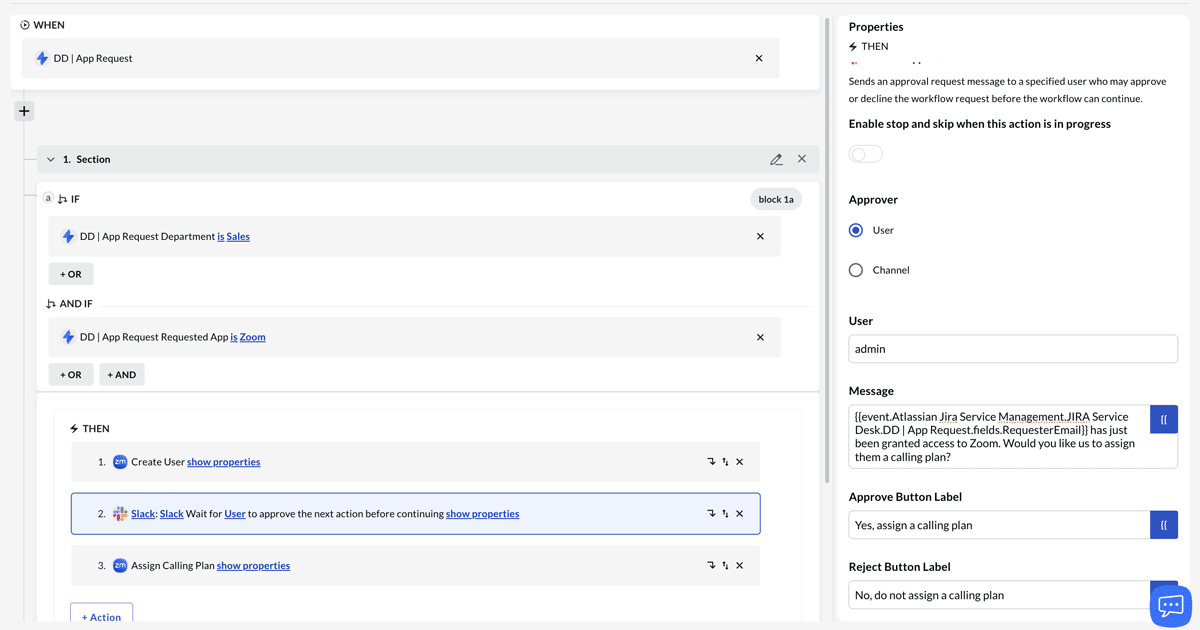
his transforms the conversation from “You can’t use that” to “Here are the amazing tools you can use to get your job done safely and efficiently.” It empowers employees, encourages innovation within safe guardrails, and makes IT a strategic partner rather than a roadblock.
Trust but verify: Granular controls for secure self-service
This self-service model is built on a foundation of trust and verification, with robust, built-in controls to ensure security and compliance. These are not just open floodgates; they are guided pathways with automated checks and balances. This includes:
- Automated approval workflows: Requests can be automatically routed to managers for approval, ensuring proper oversight without creating bottlenecks.
- Role-based access control (RBAC): You can define granular permissions based on an employee’s role or department. This means employees only see and can request the applications and access levels that are relevant to their job function, reducing confusion and risk.
- Policy enforcement: The system can enforce other granular policies as needed, ensuring that all requests adhere to your organization’s security and compliance standards.

By automating these checks, you can scale your ability to respond, ensure consistency, and educate users in real-time, all while maintaining a strong security posture.
The rise of shadow AI
Just when you thought you had a handle on shadow IT, a new challenger has entered the ring: shadow AI. This is the next frontier of unmanaged risk, and it’s even more insidious and difficult to detect than traditional shadow IT.
Defining the new threat: What is shadow AI?
Shadow AI refers to any artificial intelligence tool, add-on, browser extension, or embedded feature that employees are using without IT oversight. This includes:
- Generative AI platforms: Employees feeding company data, strategic plans, or even sensitive code into public AI models like ChatGPT or Bard.
- Embedded AI features: Many sanctioned SaaS applications are now rolling out their own AI features. Employees might be enabling these features and connecting them to sensitive data sources without understanding the security or compliance implications.
The unique challenges of shadow AI
Shadow AI is a different beast. It’s often harder to detect because it isn’t always a standalone application. It can be an API call to an AI model, a feature buried deep within an existing application, or a browser extension that looks harmless on the surface. Traditional detection methods are almost completely blind to it. Network logs might just show traffic to a major cloud provider, not the specific AI service being used.
The risks are also amplified. With generative AI, the potential for massive data leaks is enormous. A single employee pasting a confidential M&A document into a public AI chatbot could have catastrophic consequences.
The solution: Proactive and intelligent detection
This is where a modern SaaS management platform with a powerful browser extension becomes absolutely essential.
To combat shadow AI, you need a solution that can:
- See all web activity: The BetterCloud Chrome Browser Extension acts as your real-time scout on the front lines. Powered by G2’s comprehensive taxonomy, it automatically knows what’s a business app and what isn’t. This allows it to instantly identify and flag logins to any application—especially emerging AI tools—giving you the complete picture of your SaaS footprint as it happens.
- Analyze data flows and API calls: Advanced discovery can help identify unusual data flows and API calls that might indicate an AI tool is being integrated with one of your sanctioned applications.
- Automate responses: The same automated workflows you use for traditional shadow IT can be adapted for shadow AI. When a user navigates to an unsanctioned AI website, you can automatically trigger a workflow to block the site, alert security, and educate the user about the company’s AI usage policy and direct them to sanctioned AI tools.
Shadow AI is the new frontier of risk, and you can’t afford to be flying blind. A proactive, modern approach to discovery is the only way to get ahead of this emerging threat.
From chaos to control
The explosion of SaaS has been a double-edged sword. It has unlocked incredible productivity but has also unleashed the chaos of Shadow IT, a problem now supercharged by the rise of shadow AI.
Here are the key takeaways:
- Shadow IT is a major risk: It’s a security, compliance, and financial time bomb ticking in the background of your organization.
- Traditional detection is broken: Manual, reactive methods are too slow and full of blind spots to be effective in the modern, hybrid-work world.
- A unified platform is the solution: The only way to win is with a comprehensive SaaS Management Platform that provides automated, real-time discovery and remediation.
Managing shadow IT isn’t about stifling innovation or being a digital dictator. It’s about being a strategic business partner. It’s about ensuring that the technology your employees use aligns with your security protocols, compliance requirements, and business goals. It’s about transforming chaos into a controlled, secure, and productive ecosystem. By shining a light on the shadows, you not only eliminate risk but also uncover opportunities to empower your users with the best and safest tools for the job.
Ready to see what’s lurking in your SaaS environment? Schedule a demo with BetterCloud today and get a comprehensive look at how you can discover, manage, and secure your digital workplace.

