
The 10 Best Self-Hosted AI Models You Can Run at Home


Half the “open-source” models people recommend on Reddit would make Richard Stallman’s eye twitch. Llama uses a Community license with strict usage restrictions, and Gemma comes with Terms of Service that you should absolutely read before shipping anything with it.
The term itself has become meaningless due to overuse, so before we recommend any software, let’s first clarify the definition.
What you actually need are open-weight models. Weights are the downloadable “brains” of the AI. While the training data and methods might remain a trade secret, you get the part that matters: a model that runs entirely on hardware you control.
What’s the Difference Between Open-Source, Open-Weights, and Terms-Based AI?
“Open” is a spectrum in modern AI that requires careful navigation to avoid legal pitfalls.
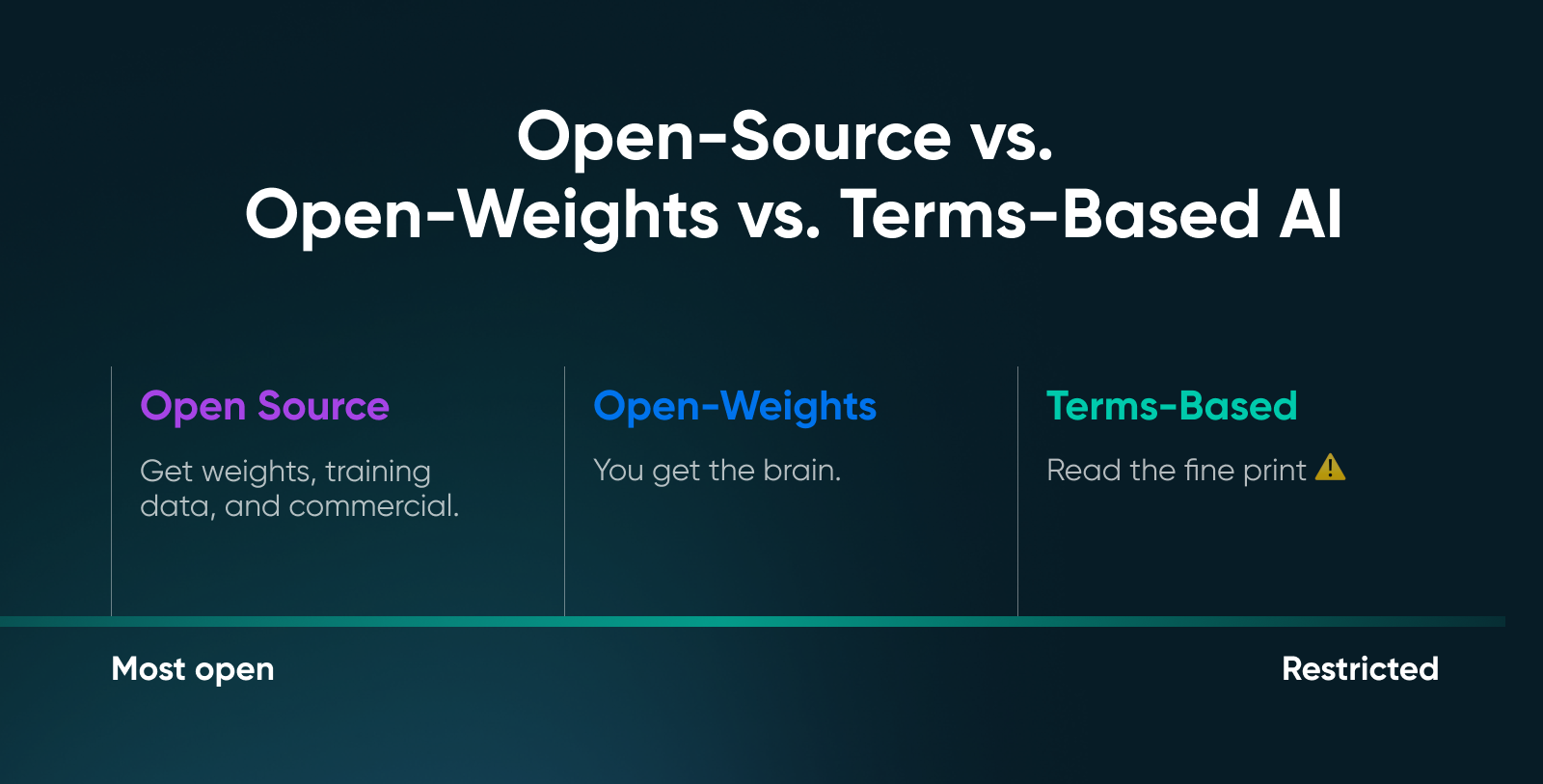
We’ve broken down the three primary categories that define the current ecosystem to clarify exactly what you are downloading.
Why Does the Definition of “Open” Matter?
Open-weights models entered a more mature phase somewhere around mid-2025. “Open” increasingly means not just downloadable weights, but how much of the system you can inspect, reproduce, and govern.
- Open is a spectrum: In AI, “open” isn’t a yes/no label. Some projects open weights, others open training recipes, and others open evaluations. The more of the stack you can inspect and reproduce, the more open it really is.
- The point of openness is sovereignty: The real value of open-weight models is their control. You can run them where your data lives, tune them to your workflows, and keep operating even when vendors change pricing or policies.
- Open means auditable: Openness doesn’t magically remove bias or hallucinations, but what it does give you is the ability to audit the model and apply your own guardrails.
💡Pro tip: If you’re unsure what category the model you picked falls into, do a quick sanity check. Find the model card on Hugging Face, scroll to the license section, and read it. Apache 2.0 is usually the safest choice for commercial deployment.
How Does GPU Memory Determine Which Models You Can Run?
Nobody chooses the “best” model on the market. People choose the model that best fits their VRAM without crashing. The benchmarks are irrelevant if a model requires 48GB of memory and you are running an RTX 4060.
To avoid wasting time on testing impossible recommendations, here are three distinct factors that consume your GPU memory during inference:
- Model weights: This is your baseline cost. An 8-billion parameter model at full precision (FP16) needs roughly 16GB just to load — double the parameters, double the memory.
- Key-value cache: This grows with every word you type. Every token processed allocates memory for “attention,” meaning a model that loads successfully might still crash halfway through a long document if you max out the context window.
- Overhead: Frameworks and CUDA drivers permanently reserve another 0.5GB to 1GB. This is non-negotiable, and that memory is simply gone.
However, if you want to run larger parameter models, look into quantization. Quantizing the weight precision from 16-bit to 4-bit can shrink a model’s footprint by roughly 75% with barely any loss in quality.
The industry standard — Q4_K_M (GGUF format) — retains about 95% of the original performance for chat and coding while reducing the memory requirements.
What Can You Expect From Different VRAM Configurations?
Your VRAM tier dictates your experience, from fast, simple chatbots to near-frontier reasoning capabilities. This quick table is a realistic look at what you can run.
🤓Nerd note: Context length can blow up memory faster than you expect. A model that runs fine with 4K context might choke at 32K. So, don’t max out context unless you’ve done the math.
The 10 Best Self-Hosted AI Models You Can Run at Home
We’re grouping these by VRAM tier because that is what actually matters. Benchmarks come and go, but your GPU’s memory capacity is a physical constant.
Best Self-Hosted AI Models for 12GB VRAM
For the 12GB tier, you are looking for efficiency. You want models that punch above their weight class.
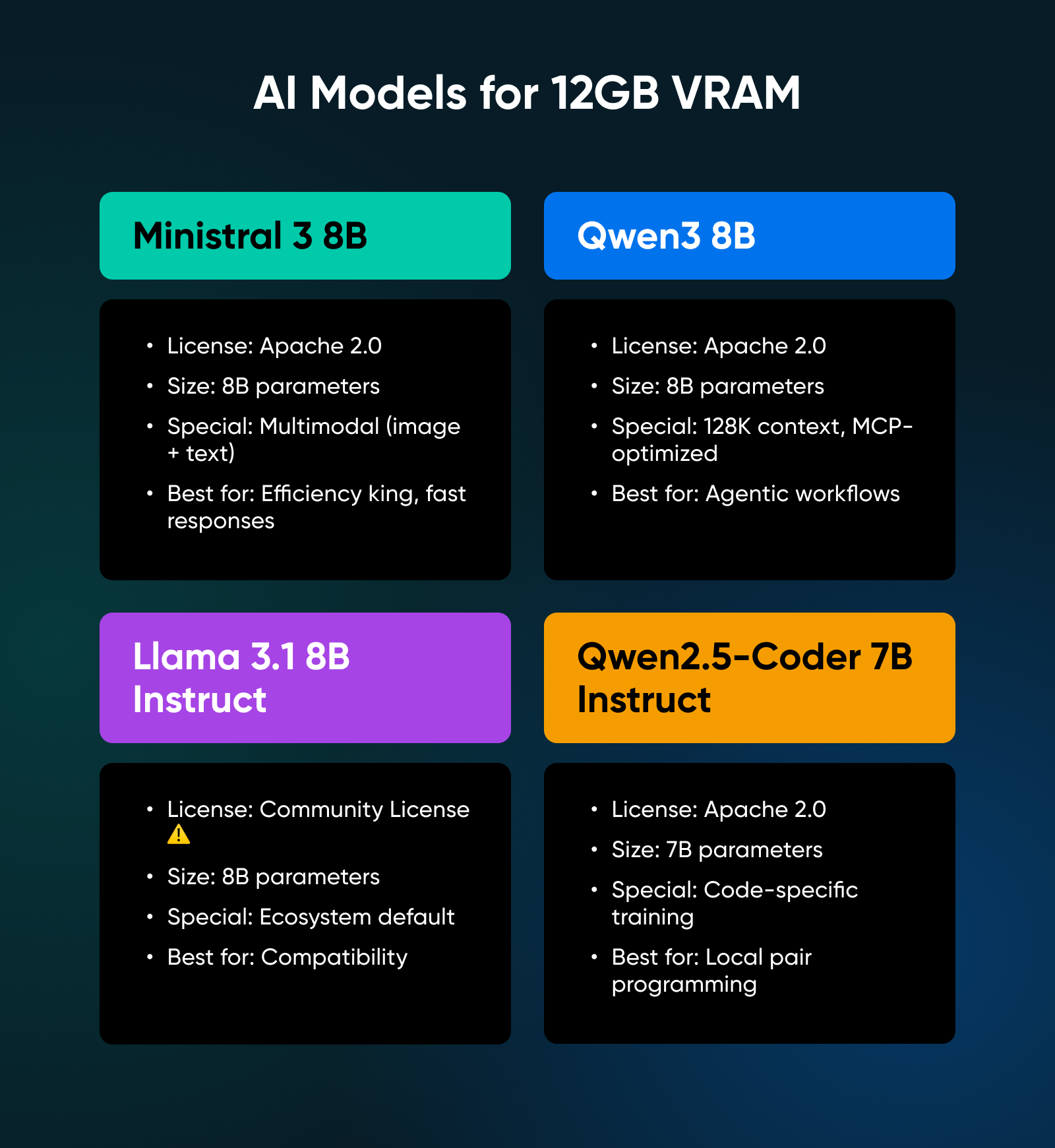
1. Ministral 3 8B
Released in December 2025, this immediately became the model to beat at this size. It’s Apache 2.0 licensed, multimodal (can process images along with text), and optimized for edge deployment. Mistral trained it alongside their larger models, which you will notice in the output quality.
✅Verdict: Ministral is the efficiency king; its unique tendency toward shorter, more precise answers makes it the fastest general-purpose model in this class.
2. Qwen3 8B
From Alibaba, this model ships with a feature nobody else has figured out yet: hybrid thinking modes. You can instruct it to think through complex problems step-by-step or disable reasoning for quick responses. It features a 128K context window and was the first model family trained specifically for the Model Context Protocol (MCP).
✅Verdict: The most versatile 8B model available, specifically optimized for agentic workflows where the AI needs to handle complex tools or external data.
3. Llama 3.1 8B Instruct
This remains the ecosystem default. Every framework supports it, and every tutorial uses it as an example. However, note the license: Meta’s community agreement is not open-source, and strict usage terms apply.
✅Verdict: The safest bet for compatibility with tutorials and tools, provided you have read the Community License and confirmed your use case complies.
4. Qwen2.5-Coder 7B Instruct
This model exists for just one purpose: writing code. Trained specifically on programming tasks, it outperforms many of the larger general-purpose models on code-generation benchmarks while requiring less memory.
✅Verdict: The industry standard for a local pair programmer; use this if you want Copilot-like suggestions without sending proprietary code to the cloud.
Best Self-Hosted AI Models for 16GB VRAM
Moving to 16GB allows you to run models that offer a genuine inflection point in reasoning. These models don’t just chat; they solve problems.
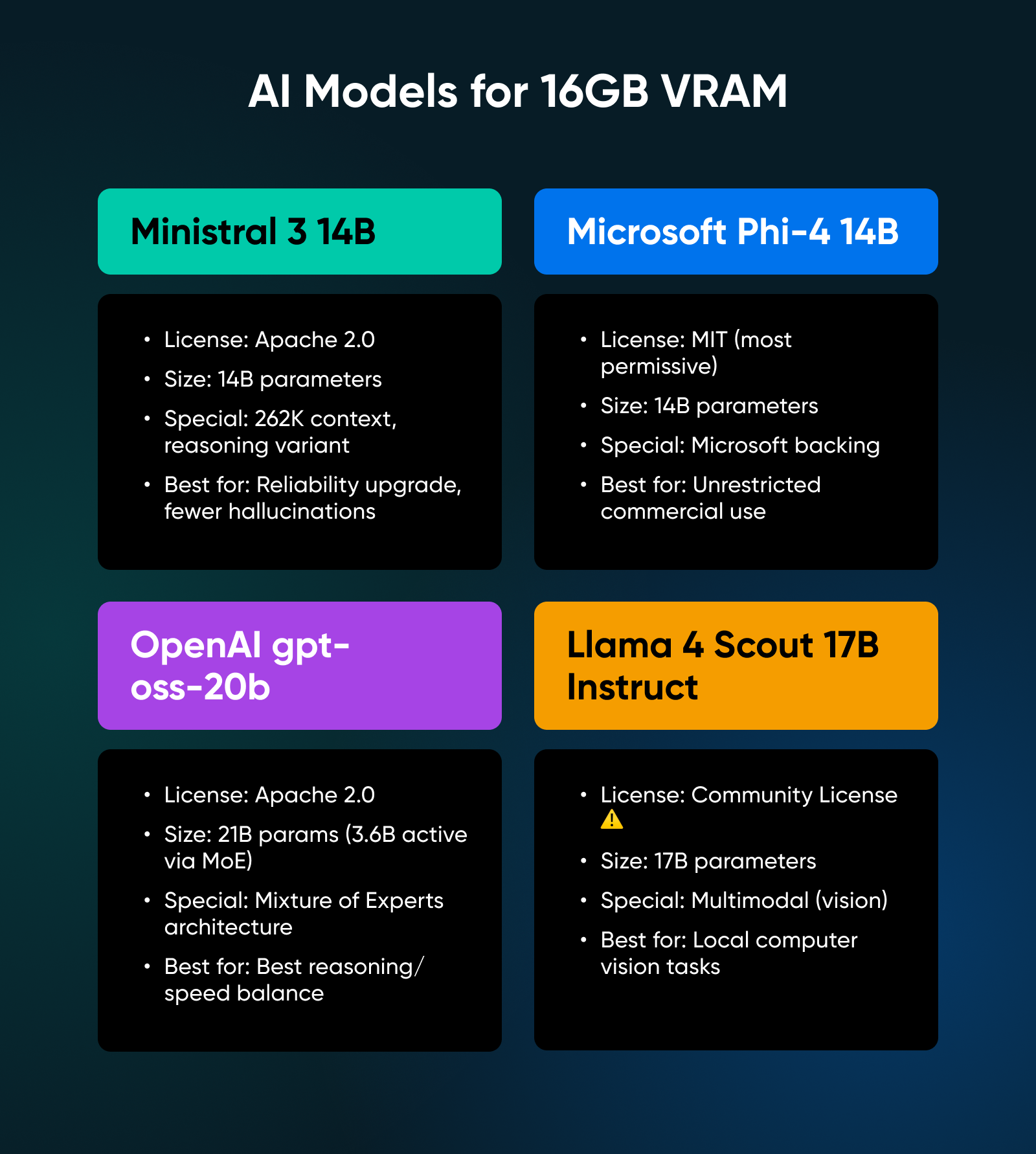
5. Ministral 3 14B
This scales up the architecture of the 8B version with the same focus on efficiency. It offers a 262K context window and a reasoning variant that hits 85% on AIME 2025 (a competition math benchmark).
✅Verdict: A genuine reliability upgrade over the 8B class; the extra VRAM cost pays off significantly in reduced hallucinations and better instruction following.
6. Microsoft Phi-4 14B
Phi-4 ships under the MIT license, the most permissive option available. No usage restrictions whatsoever; it offers strong performance on reasoning tasks and boasts Microsoft’s backing for long-term support.
✅Verdict: The legally safest choice; choose this model if your primary concern is an unrestrictive license for commercial deployment.
7. OpenAI gpt-oss-20b
After five years of closed-source development, OpenAI released this open-weight model with an Apache 2.0 license. It uses a Mixture of Experts (MoE) architecture, meaning it has 21 billion parameters but only uses 3.6 billion active parameters per token.
✅Verdict: A technical marvel that delivers the best balance of reasoning capability and inference speed in the 16GB tier.
8. Llama 4 Scout 17B Instruct
Meta’s latest release of the Llama model improves upon the multimodal capabilities introduced to the Llama family in version 3, allowing you to upload images and ask questions about them.
✅Verdict: The best and most polished option for local computer vision tasks, allowing you to process documents, receipts, and screenshots securely on your own hardware.
Best Self-Hosted AI Models for 24GB+ VRAM
If you have an RTX 3090 or 4090, you enter the “Power User” tier, where you can run models that approach frontier-class performance.
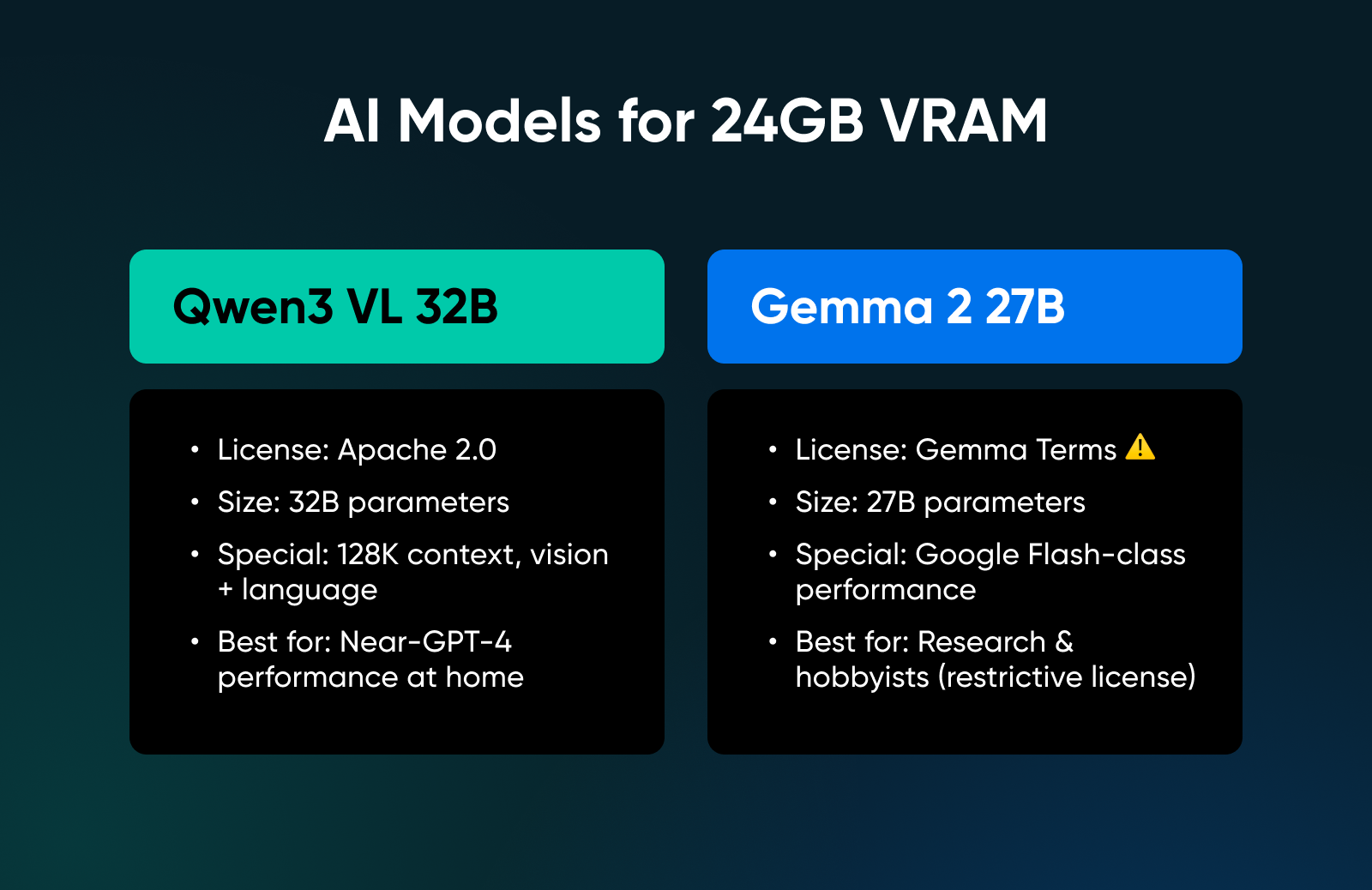
9. Qwen3 VL 32B
This model targets the 24GB sweet spot specifically. It offers almost everything you’d need: Apache 2.0 licensed, 128K context, vision and language model with performance matching the previous generation’s 72B model.
✅Verdict: The absolute limit of single-GPU local deployment; this is as close to GPT-4 class performance as you can get at home without buying a server.
10. Gemma 2 27B
Google has released a bunch of really strong Gemma models, of which this one is the closest to their Flash models available online. But note that this model isn’t multi-modal; it does however offer strong language and reasoning performance.
✅Verdict: A high-performance model for researchers and hobbyists, though the restrictive license makes it a difficult sell for commercial products.
Bonus: Distilled Reasoning Models
We have to mention models like DeepSeek R1 Distill. These exist at multiple sizes and are derived from larger parent models to “think” (spend more tokens processing) before answering.
Such models are perfect for specific math or logic tasks where accuracy matters more than latency. However, licensing depends entirely on the base model lineage, where some variants are derived from Qwen (Apache 2.0), while others are derived from Llama (Community License).
Always read the specific model card before downloading to confirm you are compliant.
You have the hardware and the model. Now, how do you actually run it? Three tools dominate the landscape for different types of users:
1. Ollama
Ollama is widely considered the standard for “getting it running tonight.” It bundles the engine and model management into a single binary.
- How it works: You install it, type ollama run llama3 or another model name from the library, and you’re chatting in seconds (depending on the model size and your VRAM).
- The killer feature: Simplicity — it abstracts away all the quantization details and file paths, making it the perfect starting point for beginners.
2. LM Studio
LM Studio provides a GUI for people who prefer not to live in terminals. You can visualize your model library and manage configurations without memorizing command-line arguments.
- How it works: You can search for models, download them, configure quantization settings, and run a local API server with a few clicks.
- The killer feature: Automatic hardware offloading; it handles integrated GPUs surprisingly well. If you are on a laptop with a modest dedicated GPU or Apple Silicon, LM Studio detects your hardware and automatically splits the model between your CPU and GPU.
3. llama.cpp Server
If you want the raw power of open-source without any “walled garden,” you can run llama.cpp directly using its built-in server mode. This is often preferred by power users because it eliminates the middleman.
- How it works: You download the llama-server binary, point it at your model file, and it spins up a local web server — it’s lightweight and has zero unnecessary dependencies.
- The killer feature: Native OpenAI compatibility; with a simple command, you instantly get an OpenAI-compatible API endpoint. You can plug this directly into dictation apps, VS Code extensions, or any tool built for ChatGPT, and it just works.
When Should You Move From Local Hardware to Cloud Infrastructure?
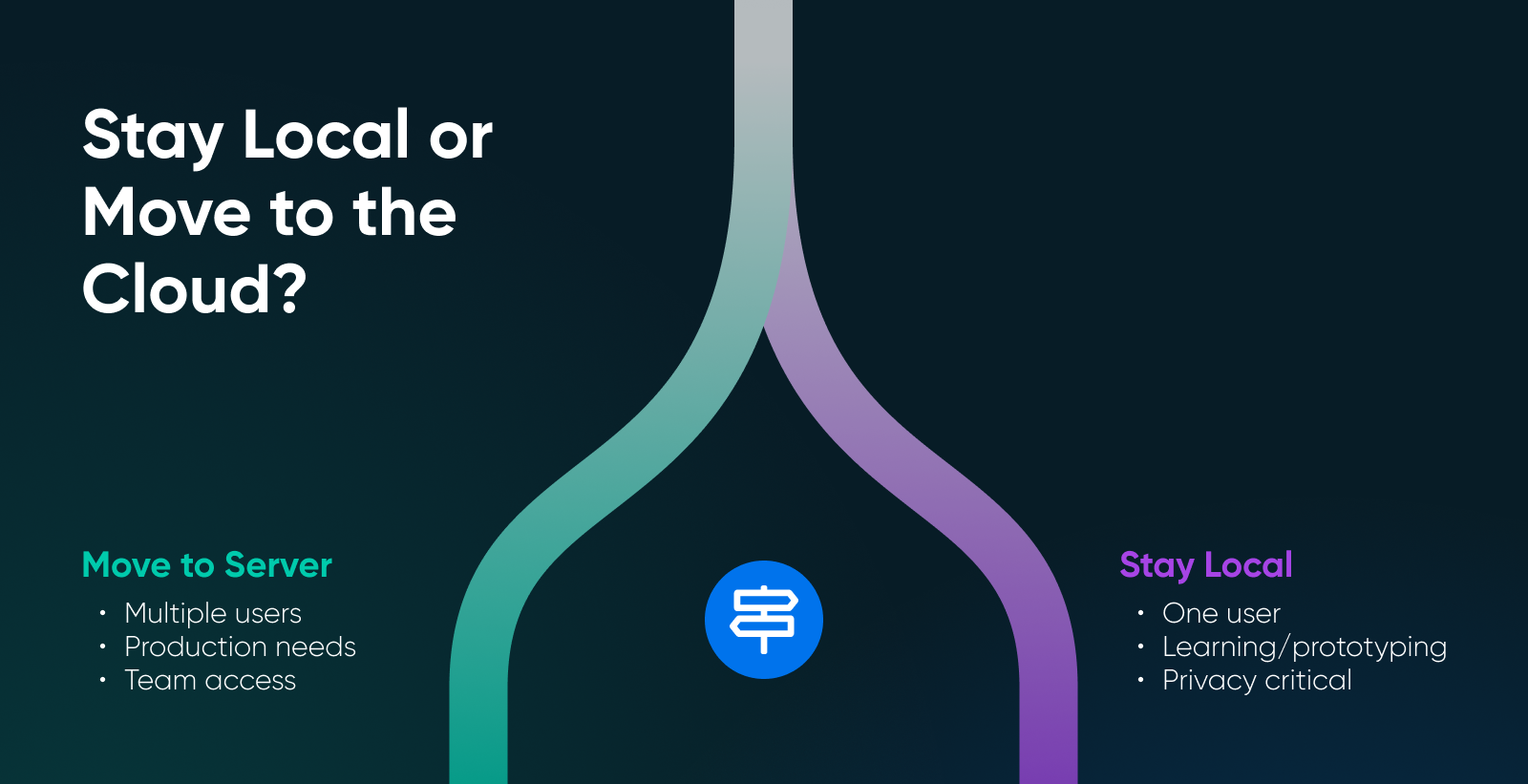
Local deployment has limits, and knowing them saves you time and money.
Single-user workloads run great locally, because it’s you and your laptop against the world. Privacy’s absolute, latency’s low, and you have cost zero after hardware. However, multi-user scenarios get complicated fast.
Two people querying the same model might work, 10 people will not. GPU memory doesn’t multiply when you add users. Concurrent requests queue up, latency spikes, and everyone gets frustrated. Furthermore, long context plus speed creates impossible tradeoffs. KV cache scales linearly with context length — processing 100K tokens of context eats VRAM that could be running inference.
If you need to build a production service, the tooling changes:
- vLLM: Provides high-throughput inference with OpenAI-compatible APIs, production-grade serving, and optimizations consumer tools skip (like PagedAttention).
- SGLang: Focuses on structured generation and constrained outputs, essential for applications that must output valid JSON.
These tools expect server-grade infrastructure. A dedicated server with a powerful GPU makes more sense than trying to expose your home network to the internet.
Here’s a quick way to decide:
- Run local: If your goal is one user, privacy, and learning.
- Rent infrastructure: If your goal is a service + concurrency + reliability.
Start Building Your Self-Hosted LLM Lab Today
You run models at home because you want zero latency, zero API bills, and total data privacy. But your GPU becomes the physical boundary. So, if you try to force a 32B model into 12GB of VRAM, your system will crawl or crash.
Instead, use your local machine to prototype, fine-tune your prompts, and vet model behavior.
Once you need to share that model with a team or guarantee it stays online while you sleep, stop fighting your hardware and move the workload to a dedicated server designed for 24/7 uptime.
You still get the privacy of local as dedicated servers only log hours of use, not what you chat with the hosted model. And you also skip the upfront hardware costs and setup.
Here are your next steps:
- Audit your VRAM: Open your task manager or run nvidia-smi. That number determines your model list. Everything else is secondary.
- Test a 7B model: Download Ollama or LM Studio. Run Qwen3 or Ministral at 4-bit quantization to establish your performance baseline.
- Identify your bottleneck: If your context windows are hitting memory limits or your fan sounds like a jet engine, evaluate if you’ve outgrown local hosting. High-concurrency tasks belong on dedicated servers, and you may just need to make the switch.

Dedicated Hosting
Ultimate in Power, Security, and Control
Dedicated servers from DreamHost use the best hardware and software available to ensure your site is always up, and always fast.
See More
Frequently Asked Questions About Self-Hosted AI Models
Can I run an LLM on 8GB VRAM?
Yes. Qwen3 4B, Ministral 3B, and other sub-7B models run comfortably. Quantize to Q4 and keep context windows reasonable. Performance won’t match larger models, but functional local AI is absolutely possible on entry-level GPUs.
What model should I use for 12GB?
Ministral 8B is the efficiency winner. And if you’re doing heavy agentic work or tool-use, Qwen3 8B handles the Model Context Protocol (MCP) better than anything else in this weight class.
What’s the difference between open-source and open-weights?
Open-source (strict definition) means you have everything needed to reproduce the model: training data, training code, weights, and documentation.
Open-weights means you can download and run the model, but training data and methods may be proprietary.
When should I use hosted inference instead of local?
When the model doesn’t fit in your VRAM, even when quantized — when you need to serve multiple concurrent users, when context requirements exceed what your GPU can handle, or when you need service-grade reliability with SLOs and support.
Did you enjoy this article?

