
The 6 Best Google Analytics Alternatives that We Recommend

Google Analytics used to be the best way to understand what was happening on your site. But the latest version, Google Analytics 4 (GA4), is driving users away.
The interface is confusing, the learning curve is horrifying, and the data accuracy is questionable. So if you feel like you got rugpulled by Google and want a better web analytics tool, you aren’t alone.
The best alternative overall is Crazy Egg, which offers a free and capable replacement for Google Analytics most important functions. I’ll cover it in detail along with several other platforms that can save you from the nightmare that is GA4.
My Personal Top 3 Alternatives to Google Analytics
Here’s a quick look at where I settled for the three best options:
As you can tell from these recommendations, your best choice depends on what’s driving you mad about Google Analytics, and what level of resources you have to get a replacement up and running.
- If you just want clear web analytics with conversion tracking without paying a dime, Crazy Egg is the best all-around option.
- If it’s the privacy concerns that come with using a free tool from Google (the world’s largest advertiser), Plausible is going to be appealing.
- If your developers hate working in GA4, I’d point them to PostHog and see what they say.
But before we dive into reviews of my top picks and the other GA4 alternatives, let me walk you through my thinking.
How I Chose These Google Analytics Alternatives
As much as I can’t stand GA4, it’s a really powerful tool. Any viable alternative has some big shoes to fill.
Thankfully, there are plenty of companies putting out products to meet the demand from millions of users who long for a better analytics option. Here’s what I considered as I built this list:
- How fully the tool replaces Google Analytics. I wanted to make sure my recommendations could handle a similar range of responsibilities, helping people understand traffic, engagement, conversions, and monetization.
- How similar the experience is to the old Google Analytics. Many people looking for an alternative loved prior versions of Google Analytics, so I prioritized options that had the clean interface, simple navigation, and easy conversion tracking.
- How much you can do for free. Google Analytics has always been a free tool, so I looked for options with a truly free forever plan, though I did include some strong alternatives with reasonable pricing.
- The depth of built-in analytics that go beyond GA4. I viewed extra features that help you better understand user behavior and traffic acquisition as a huge plus.
- How steep the learning curve is. Plenty of people who need web analytics don’t have a developer or data scientist on staff, so I made sure to pick a few alternatives that non-technical users can set up and understand.
- How easy it is to import GA4 data. Even when you use another platform for your day-to-day analysis, everyone I know still has GA4 on their site to help with SEO and paid search on Google Ads, so I wanted to find options where bringing in data was easy.
- How the tool handles user data. Google is in the advertising business and GA4 picks up a lot of data on users. Some people (and regulatory bodies) have a problem with this arrangement, so I wanted to include a few privacy-first options that comply with important regulations by default.
The final list I ended up with includes a range of analytics platforms that all hit on most of these criteria.
Some are lighter tools that non-technical users can jump in and start using right away, others skew more towards the event-based product analytics category (where GA4 sits today) that can help folks tracking activity across their site and mobile apps.
There’s always tradeoffs. The privacy-first tools won’t capture the same level of demographic data that GA4 picks up. The product analytics tools can do a lot more than the web analytics ones, but they have a much steeper learning curve.
You know the resources you have and the depth of the analytics you need. What follows are short reviews of my top picks that can help you find a tool that you’re confident is going to work.
1. Crazy Egg – Best Truly Free Alternative
Free forever plan includes: Web analytics, conversion tracking, surveys, and instant heatmaps
Paid plans start at: $29 per month
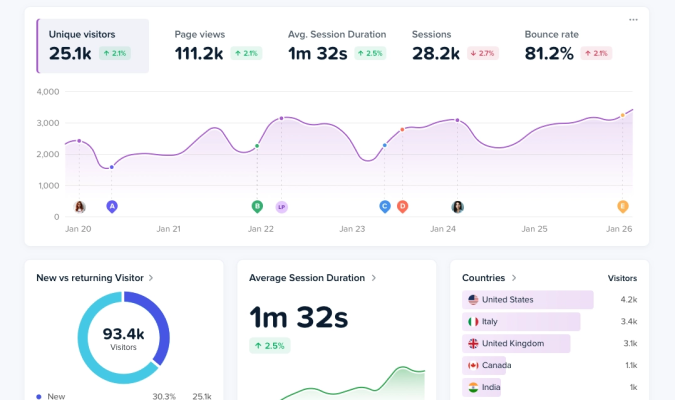
Crazy Egg is the closest thing to a free alternative to Google Analytics I could find. Many people will be able to replace GA4 to get the instant, easy insights that they used to expect with previous Google Analytics products.
What I personally like about Crazy Egg
- Clear visual displays of what’s happening on your site
- Live traffic monitoring
- Won’t slow down your site
- AI summaries of key information and trends
- Conversion tracking is very easy to setup
- Instant heatmaps are now available on free plans
- Free survey tool gathers qualitative data
- Visual analytics tools are useful for CRO
What I personally dislike about Crazy Egg
- Session recording and heatmaps limits can be constricting
- Deep product analytics will require a separate tool
- No path exploration tool
Crazy Egg is aimed at digital marketers and business owners who need to understand what’s happening on their site quickly, without endless configuration.
I’m not a data scientist nor a developer, and Crazy Egg is one of the few tools on the market that lets me answer important questions about my traffic without having to get help.
If I want to know what needs to happen to get more clicks, optimize conversion rates, or increase organic search traffic, it takes me 10 seconds with Crazy Egg. The user interface is intuitive. It reminds me a lot of how Google Analytics used to be.
The free plan includes a legitimate GA4 replacement for web analytics. Pre-built reports cover all the traffic metrics that matter. It doesn’t have the path analysis from GA4 (which is really useful), but you can integrate GA4 with Crazy Egg for your day-to-day web analytics, and then jump over to GA4 for pathing or other explorations.
Conversion tracking in Crazy Egg is set up with a point-and-click editor. No code necessary, which is a lot easier than many of my other top picks. And unlike GA4, I don’t have to worry about setting up a “key event” just to understand who’s making a purchase or clicking a link I care about.
One standout capability are the AI-driven insights that are served alongside your reports. These short summaries automatically highlight trends and patterns in the data. They’re new every time you load the page. For beginners, they are really helpful, and for advanced users, they are a nice time-saver.
Along with web analytics and conversion tracking, you also get surveys and instant heatmaps. GA4 doesn’t have either of those, and they help you get quick qualitative and behavioral data to inform your decision-making. Really useful, and totally free.
Upgrading to paid plans expands the behavioral analytics feature set, with session recordings, more advanced heatmapping tools, and A/B testing. All of these tools can help you better understand what users are doing, why, and how to improve their experience on your site.
A quick look at the main features available with Crazy Egg:
- Real-time web analytics
- Conversion tracking
- Traffic analysis
- Surveys
- Heatmaps
- Funnel analysis
- Session recordings
- A/B testing
- Error tracking
- Popup offers
The other alternatives I looked at gave me too little in terms of page view caps and analytic depth. Or they gave me way too much customizability in the sense that I would need to pull in a developer to set up even basic conversion tracking.
There were some other platforms that offered a comparable balance of power and ease of use to Crazy Egg, but they didn’t offer a free plan.
I assumed that lots of people would be looking for something to replace GA4 that didn’t cost money, but besides Crazy Egg, there’s not really a good free-forever option.
So if you are in the market for something free, that handles the basic responsibilities of GA4, and won’t require a developer set up, this is your best bet.
2. Plausible – Best for User Privacy
Free forever plan: No. 30-day free trial
Paid plans start at: $9 per month
Plausible is a no-frills, open-source platform that makes tracking web analytics a lot less painful than using GA4. It’s a privacy-first platform with a lightweight script that won’t slow down your site.
What I personally like about Plausible:
- Cookieless analytics (no consent banner needed in most jurisdictions)
- Intuitive dashboards
- Google Search Console (GSC) integration
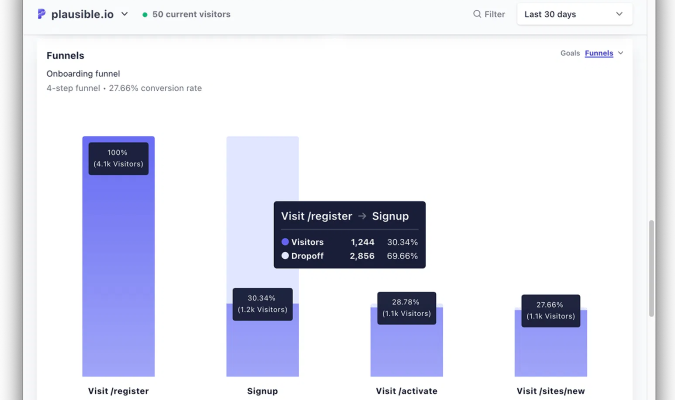
- You can follow customer journeys through funnels
- GDPR, CCPA, and PECR compliant by default
- Easy to import GA4 data
- Shareable dashboards
What I personally dislike about Plausible:
- No built-in visual analytics like heatmaps or session recordings
- Pricing is tied to page-views
- No free forever option
- Conversion tracking can get tricky for non-technical users
For people that are worried about privacy and compliance, especially those based in the EU, Plausible is a budget-friendly GA4 alternative that will keep you out of hot water with regulators.
It tracks all the crucial web analytics metrics like sessions, page views, bounce rate and so on. But there’s also some useful standout features that made me rank it above many competitors.
The most important one is the lack of cookies. Because of this, Plausible users can get away without having to put an ugly privacy banner on their website (Note: I am not a lawyer, so double check that this is true in your country).
No cookie consent banner improves the user experience for your visitors, which likely increases conversions, and definitely improves the accuracy of the web analytics data you get.
It depends which study you read, but they all show that platforms like GA4 miss about 30-40% of website visitors using ad blockers or declining consent. So if you are annoyed by inaccurate Google Analytics data, this is a huge plus.
Because I’m an SEO nerd, I really like the GSC integration that allows you to see which keywords are driving traffic to your site. Sure, you can open another tab and jump back and forth, but being able to see search query data alongside traffic data will save a lot of time.
Here’s a basic overview of what’s included:
- Real-time web analytics
- Basic segmentation
- Conversion tracking
- Revenue tracking
- Funnel analysis
- GSC integration
- Scroll depth tracking
- Bot-filtering
This is a pure web analytics platform that handles the fundamentals well. It doesn’t have the same range of behavioral analytics tools as Crazy Egg, though it does tell you how far people scroll down a page. It’s not a full scrollmapping feature, but still very useful during a quick page audit.
The installation and setup is pretty straightforward, and you can set up basic conversion tracking (like form fills) simply by checking a box during the installation.
When it comes to tracking custom conversions, you have some no-code options via Google Tag Manager or a WordPress plugin. Otherwise you have to do a little bit of coding.
It’s not as complex as Pirsch, but I wanted to call it out as tracking custom events in Plausible may not be as straightforward as something like Crazy Egg.
All in all, I would shortlist Plausible if you are worried about picking up too much user data. The tradeoff is that you’ll miss a lot of the demographic and psychographic data that GA4 picks up, but you’ll have a lot less to worry about with regards to GDPR, CCPA, and other laws.
3. PostHog – Best for Developers
Free forever plan includes: Web and product analytics, session recording, surveys, and experiments, feature flags, and more.
Usage-based pricing: Pay-as-you-go plans are priced per service and kick in once you exhaust your free tier limits each month.
PostHog is ideal for technical marketers, product managers, and developers who want total control over how they capture and analyze user journeys. If you have developers who can stand this up and maintain it, then it’s an option you should seriously consider.
What I personally like about Posthog:
- The incredibly generous free plan (1 million events per month)
- SQL access is available throughout the platform
- Self-hosting options available
- The feature-depth can replace multiple tools
- Cookieless tracking available
- Highly customizable event tracking
What I personally dislike about Posthog:
- Not accessible to non-developers
- Pay-as-you-go pricing can get expensive
- Self-hosting is really challenging, even for advanced users
PostHog is not trying to be an accessible-to-everyone platform. It’s built by developers, for developers. This is not a beginner-friendly replacement for GA4, which turns out to be a big part of the appeal.
One of the main issues that people have with GA4 is the overwhelming optionality. In theory, you could point and click your way to a report that captures any event. In practice, it frustrates beginners who can’t set up the basic analytics they need, and annoys advanced users who have to navigate hundreds of preset dropdowns for events they don’t care about.
PostHog assumes technical self-sufficiency and lets teams use SQL in many parts of the platform, like filters and dashboards. This makes it much easier to build custom analyses and work with the data than GA4, which requires you to pull data into BigQuery.
It’s also got a lot of tools that GA4 simply doesn’t offer, like feature flagging, session recordings, A/B testing, error tracking, and surveys.
A big selling point of PostHog is that it can replace five or six different tools, which saves money and all the headaches that come with integration. You can get all of your answers for web and product analytics in one place.
Here’s a rundown of (some of) what PostHog offers:
- Web and product analytics
- Session replay
- A/B testing
- Error tracking
- Feature flags
- Logs
- Funnel analysis
- User paths
- Heatmaps
- Workflows and triggers
- User tracking
- SQL editor
The team at Posthog keeps adding new features. At the time of writing, revenue analytics and no-code A/B testing are in beta, and they are working on a coding agent.
If your goals are basic web and traffic analytics, I’d go with a lighter option. The learning curve is real, so if you don’t have the developer resources in-house to use this tool, you’ll wind up paying a lot for a “free” plan. There are a handful of strong PostHog alternatives if it’s a close call, but not quite what you’re looking for.
But if you need deep, customizable analytics and experimentation, this is a great platform. Developers will like working with it a lot more than GA4, and they’ll probably be able to save lots of money compared to a similarly powerful solution like Mixpanel or Amplitude.
Check out this comparison of PostHog and GA4 for a more in-depth look at how the two platforms stack up.
4. Pirsch – Best server-side tracking
Free forever plan: No. 30-day free trial
Paid plans start at: $6 per month
Pirsch got started as a side project by two German developers who wanted to build a simpler, less-invasive way to track website visitors than Google Analytics. For individuals and agencies with web development resources, this is an appealing option, especially if you are looking for server-side tracking.
What I personally like about Pirsch:
- Unlimited users on any plan
- Server-side tracking available
- Clean, modern dashboards
- Affordable pricing tiers
- Won’t slow down your site
- GDPR-compliant
- You retain full data ownership
- Detailed filtering options
- Easy Google Analytics import
What I personally dislike about Pirsch:
- Knowing basic web development is required
- No native behavioral analytics tools
- Page-view based pricing
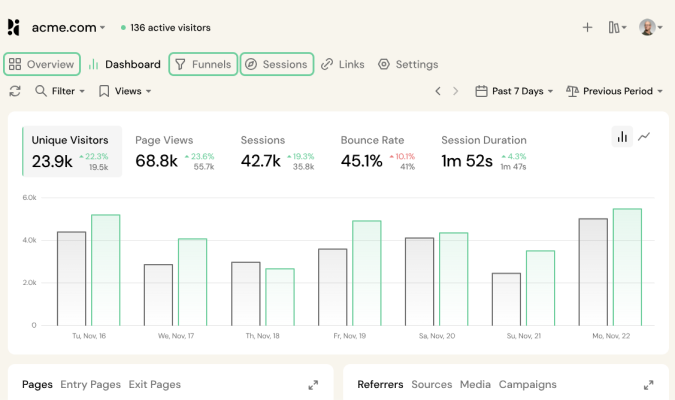
Pirsch is a lightweight web analytics tool with a focus on speed, reliability, and cost-effectiveness. It features a limited open-source version on GitHub, and a paid version available from the official Pirsch website.
This is a privacy-first platform that’s fully GDPR-, CCPA-, ePrivacy-, PECR-, and Schrems II compliant. Pirsch stores no personal data about your visitors. So it doesn’t require a cookie consent banner, and you retain full ownership of your site analytics data.
For EU-based website owners, note that all data stays on servers in Germany. So if data residency concerns are part of the reason you are looking for a GA4 alternative, Pirsch is a very attractive option. You can avoid all the potential legal exposure that comes with transferring visitor data to US-based servers.
While I think a non-technical user could set up and run Pirsch, it would not be my first choice, given the availability of truly beginner-friendly platforms like Crazy Egg and Clicky. Someone with basic web development experience is going to have an easier time configuring Pirsch to capture the data they want.
More importantly, many of the unique benefits of using Pirsch come with server-side integration, which lets you send tracking data from your server rather than running a script in the visitors browser. This means ad blockers won’t interfere with your traffic, which makes data collection much more accurate.
This is really valuable, especially if you can’t stand the data accuracy issues with GA4, but you have to be comfortable working with APIs and SDKs to use the server-side integration. You can simply integrate your site with a small code snippet, similar to GA4, but you lose out on some of the platform’s best capabilities.
Tracking conversion goals requires basic knowledge of HTML, CSS, and JavaScript. Web developers will appreciate the flexibility over what you can track and the ability to capture custom events, but beginners will have a tough time getting everything set up correctly.
Once you have set up tracking, you run fairly in-depth session analysis to understand customer journeys, monitor conversion rates, and optimize your site around what you discover.
Here’s a breakdown of the full range of features included:
- Real-time web analytics
- A/B testing
- Session analysis
- Funnel analysis
- Ecommerce revenue tracking
- URL shortener
- Public dashboards and access links
- White labelling
- Google Search Console integration
- Self-hosting (Enterprise only)
Provided you know what you are doing, the entry-level plan enables fairly advanced web analytics at a very competitive price. Upgraded plans enable you to run funnel analysis, A/B testing, and segment your audience to see how different groups perform.
This is a good choice for technical website owners as well as agencies with developers on staff. There is good feature-depth for the price and some very useful tools for people managing multiple sites or client sites.
If you are looking for server-side tracking to bypass ad-blockers and get exceptional data accuracy, I would shortlist Pirsch. And if the privacy at data residency issues associated with GA4 are a big concern, I would definitely explore this option.
5. Clicky – Best for Agencies on a Budget
Free forever includes plan: Basic web analytics
Paid plans start at: $9.99 per month
Clicky offers a very limited free forever plan and relatively inexpensive upgraded plans. It comes with a helpful set of features for agencies that want to understand what’s happening on client sites, but don’t want to invest the time or money required for the enterprise platforms.
What I personally LIKE about Clicky:
- User-friendly navigation
- Straightforward installation
- Live traffic monitoring
- Uptime monitoring
- Fast loading
- Streamlined reporting
- Free plan tracks up to 3,000 page views daily
- GDPR-compliant
- 40+ plugins with popular products and frameworks
What I personally DISLIKE about Clicky:
- The free forever version is very limited
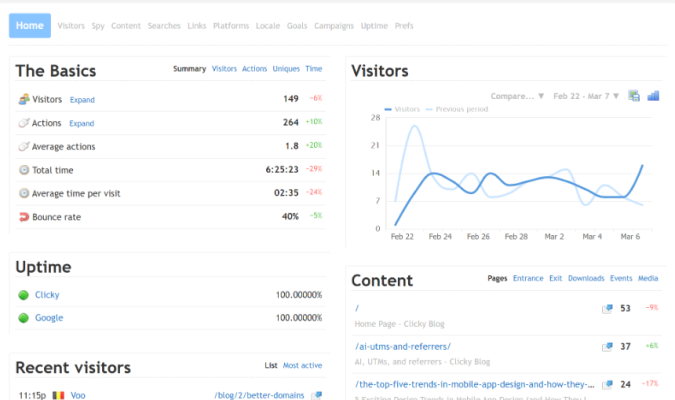
- Retro user interface (think Windows 95)
- Conversion tracking requires adding code to your site
Clicky is an established web analytics tool that offers incoming web traffic analysis in real-time. I like it for agencies because most of the tools aimed at them cost thousands of dollars per month. Clicky is a fraction of that, and requires comparatively little dev support.
One standout feature is the path analysis, which is a key GA4 feature that many web analytics tools don’t support. It’s not as visually pleasing as the GA4 version of the feature, but it is super helpful for understanding customer journeys and where they break down. In my experience, clients love and understand this type of analysis.
It also includes uptime monitoring with alerts on premium plans, which means you won’t have to find out from clients when there’s a serious issue on their site.
While not nearly as comprehensive as GA4, Clicky is far simpler to implement and easier to understand. The one exception to this is conversion tracking, which assumes you are comfortable with HTML and JS to the extent that you can edit and place a bit of code on your site.
It’s not insurmountable for beginners, but it’s not nearly as easy as Crazy Egg or GA4, which both allow point-and-click conversion tracking.
Other than that, Clicky’s reputation for being a no-frills, low-cost, user-friendly web analytics option is well deserved. The free plan tracks up to 3,000 page views per day, which is very generous, though that includes all the sites in your plan. So if you are an agency with dozens of clients, the free plan is probably not viable.
Installation is simple: paste a small code snippet or use a plugin. You’ll automatically get a 21-day free trial of the full Clicky platform, which includes:
- Real-time web analytics
- Conversion tracking
- Revenue tracking
- Heatmaps
- White labelling
- Path analysis
- Data export
- Uptime monitoring
The lowest paid plan is very reasonable, and includes everything they offer except for heatmaps and uptime monitoring, which is only available with their mid-tier, Pro-Plus plan and higher.
If all you need is basic web analytics, the free plan is a strong choice. If you are on a budget, the paid plans are much less expensive than other credible GA4 replacements, and you’ll be able to run path analysis and monitor uptimes, which many platforms don’t even offer.
I think it’s a strong choice for anyone who isn’t concerned by the dated UI. Agencies will be able to white label dashboards. These won’t wow clients with the Windows 95 aesthetic, but if you are driving traffic and revenue for them, I doubt they will care.
Dive into this full-length review of Clicky to learn more about what this platform can do and how it compares to GA4.
6. Fathom Analytics – Best for Brands Focused on Ethical Marketing
Free forever plan: No. 30-day free trial
Paid plans start at: $15 per month
Fathom is a useful alternative to GA4 for people who are willing to spend a bit of money to get a dependable, privacy-focused web analytics platform that nails the fundamentals. You don’t need to be a programmer to use it, but some of its best features are attractive to people who can code.
What I personally LIKE about Fathom Analytics:
- Modern, simple, and intuitive UI
- It can be set up in minutes
- Easy to import GA4 data
- Sources more accurate data than GA4, blocking bots, scrapers, and spam traffic
- 100% Cookieless (no consent banner required in most jurisdictions)
- Privacy-focused
- Fully GDPR-compliant
What I personally DISLIKE about Fathom Analytics:
- No free forever plan
- Not as many features compared to some of its competitors
- Lack of detailed user data
Fathom Analytics is a lightweight and user-friendly analytics tool that will work well for brands who think about user privacy from an ethical perspective, not just a compliance perspective. If you’re marketing to the types of buyers who care about a brand’s values and ethics, this is a platform you can use knowing that it truly puts user privacy first.
When you use GA4, your visitor data feeds into Google’s advertising machine, whether they know it or not. Fathom collects what you need to run your site, and nothing else.
The founders are 100% bought into the idea of ethical marketing. They charge for the platform, but it keeps them from having to go raise money, so they’re not going to be acquired tomorrow by some heartless company that will start surveilling your visitors.
The streamlined UI is built for people who don’t want to spend hours building reports just to understand what’s happening on their site. It’s been specifically designed to replace the complexity and bloat of GA4.
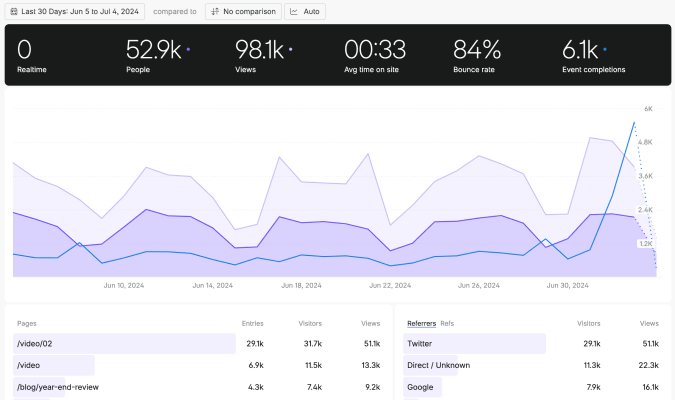
It offers all the essential tracking metrics, such as the current number of active users, the total number of users and the total number of page views over a given timeframe, the average time on site, the average bounce rate, and the total number of event completions.
All of this data is processed instantly. No waiting, unlike GA4.
Its real-time data monitoring feature, coupled with a customizable dashboard that allows customers to receive insights from multiple URLs at the same time. Accurate data, from all your accounts in a single screen. Pretty nifty.
In GA4 and most other platforms, you have to toggle between different domains or open them in separate tabs. So if switching between accounts bugs you, Fathom’s all-sites view will be a breath of fresh air.
Navigating the interface is very easy. Your average marketer is going to be able to find what they need quickly.
Setting up conversion tracking is not too tricky. You will have to add a code snippet to HTML, so it’s not quite as easy as Crazy Egg, but it’s something non-technical folks can handle with a bit of instruction.
Here’s a rundown of the main features:
- Real-time web analytics
- Conversion tracking
- Campaign tracking
- Export to CSV
- Dashboard sharing
- Multi-site management
It’s definitely not the deepest set of features in this roundup, but in terms of web analytics, it covers the basics well. Filtering your data and digging into the details is very straightforward.
It’s also got a handful of integrations with popular website builders, ecommerce platforms, and coding frameworks.
So if you care about doing right by your users, feel comfortable writing a bit of code, and want to ditch the mess that is GA4, Fathom Analytics might be what you are looking for. A few bucks a month for a dependable platform with real human customer support. Not bad.
What’s the Best Google Analytics Alternative?
The answer is that it depends on what frustrates you about GA4.
If it’s the annoying complexity, tools like Crazy Egg and Fathom make it as easy as possible to get set up with minimal configuration.
If privacy and compliance are your main concern, Pirsch and Plausible are both built around that. No cookies, consent banners, or having to worry about sensitive user data.
With the exception of PostHog, none of these tools does everything that GA4 does, but that’s part of their appeal. Most alternatives I picked do a better job of making the day-to-day analytic work easier.
Most people just need web analytics to tell them who’s on their site, what they are doing, and whether or not they’re converting. Every tool on this list will help you answer those questions faster and more clearly than GA4.
And many of them give you some useful features that go beyond what GA4 can do, like click maps, A/B testing, and session recording.
And you can still use GA4 alongside these tools. The alternatives I selected make it easy to integrate your GA4 data. You can keep GA4 running to track your Google Ads performance and manage audiences, but pipe the data into a web analytics tool that’s much easier for everyone to use.
That’s the most important thing, after all. Do you and your team like using the tool? Do you feel confident with it? That’s how I’d run my search, because the best web analytics tools are the ones you enjoy opening every day. Those will always be more effective than one you dread using.

